You can bulk edit more complex module hierarchies than those shown in previous sections. For example, a configuration may contain a module hierarchy that looks like:
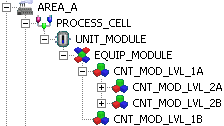
The procedure to bulk edit this hierarchy is:
-
If the modules are not based on a template, create a template for every unique equipment and control module in the hierarchy.
-
Create format specification files for each module based on a unique template. Be sure to specify the correct template as the Subtype for each specification file.
-
Create format specification files for the process cell and unit module.
-
Export items at each level.
-
Edit the exported items as required.
-
Import the edited data in the correct order.
The first four steps have been explained in detail elsewhere. The remainder of this topic explains how to perform the last two steps.