The following steps explain how to create and instance a simple class-based module.
-
In DeltaV Explorer, drag the ANALOG monitoring template in the library to the Example category under Control Module Classes to create a class.
-
Name the class F_C.
-
Open F_C in Control Studio.
-
Set the following parameters on the AI block as indicated:
L_TYPE properties:
Named state: Direct
OUT_SCALE properties:
Engineering unit descriptor: °F
-
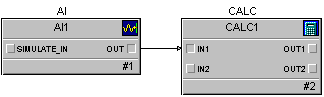
Add a Calculation function block to the class and connect the output of the AI block to the input of the Calc block. The class should look similar to the following:
-
Select the Calc block, and then select Expressions from the context menu.
-
Enter the following in the Expression Editor:
REM Two outputs: degrees F and C
'OUT1.CV' := 'IN1.CV';
'OUT2.CV' := ( 'IN1.CV' - 32 ) * 5 / 9;
NoteIt is a good idea to always start an expression with a remark (REM). If the first line of the expression starts with a quote mark, the User-Defined export and import may not interpret the expression correctly.
-
In the module's properties change the SubType to TEMPS_F_C.
NoteThe SubType must be entered in all capital letters. The user-defined import uses the Subtype to identify the module templates when it creates modules.
-
In DeltaV Explorer, drag the class F_C to a category under Module Templates.
-
Rename the resulting module template to TEMPS_F_C.
-
Create a module by dragging the TEMPS_F_C template to AREA_A.
-
Rename the module to TEMP-101.