This class-based example consists of an equipment module class (TOTALIZER) that contains two control module classes (FLO_CTRL, and TTL_FLO). Note that successful import and export of a class-based module requires that you create a module template that the import/export format file can reference. The module template and the class-based module must have the same SubType (as defined in the module template Properties dialogs) and this SubType field must be the name of the module template. The following steps explain how to create the TOTALIZER class by creating its component parts, then combining them.
-
Create the totalizer named set as explained in the Batch Tutorial topic Creating a Command-Driven Equipment Module Class (TOTALIZER).
-
In DeltaV Explorer, navigate to Library/Advanced Definitions/Equipment Module Classes/General. (You can create a new category if you want.)
-
Right-click and select New Equipment Module Class.
-
In the New dialog, name the class TTLZER_CL (for class), select Command Driven in the Algorithm Type field, and browse to the totalizer named set in the Named Set Name field.
-
Click OK.
-
Navigate to the General category of Control Module Classes.
-
Right-click and select New Control Module Class.
-
In the New dialog name the class FLO_CTRL_CL.
-
Click OK.
-
Open the class in Control Studio and add a PID block to it.
-
Save the class and close Control Studio.
-
Right-click again and create another control module class.
-
In the New dialog, name the class TTL_FLO_CL.
-
Click OK.
-
Open the class in Control Studio and add an INT block to it.
-
Save the class and close Control Studio.
For this example you do not need to fully configure the classes, but at least put the blocks in the classes so you can see how to bulk edit parameters of contained blocks.
-
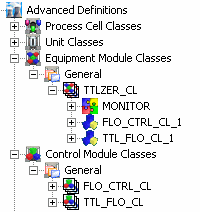
Drag FLO_CTRL_CL and TTL_FLO_CL and drop them onto TTLZER_CL.
The Advanced Definitions hierarchy should now look like the following.
-
Rename FLO_CTRL_CL_1 to FLO_CTRL_CNT (for contained module)
-
Rename TTL_FLO_CL_1 to TTL_FLO_CNT.