To successfully bulk edit class-based modules containing other class-based modules, you must create format files for each individual module. The example requires format files for TOTALIZER, FLOW_CONTROL, and TOTAL_FLOW. The steps to create format files for a contained module are slightly different than the steps to create a containing module so both are detailed below.
To create a format file for a contained module:
-
In DeltaV Explorer, select .
-
In the Filename field, enter FLOW_CONTROL to create a format file for the FLOW_CONTROL module.
-
Select Include Column Headers.
-
Specify the Object type as Module.
-
Click the Apply Filter button and make sure the appropriate filters are selected for your use.
-
Click the Browse button for the Subtype field.
-
In the Object Type field of the Browse dialog, select Module Templates.
-
Browse to and select the module template FLO_CTRL_TMP.
-
In the Select fields dialog, select module parameters you want to bulk edit. You must at least include area, module_name, and module_subtype.
-
Open the Parameter List and include parameter shortcuts for block parameters you want to bulk edit, if any.
NoteParameter shortcuts consist of the contained block name and block parameter name separated by a dollar sign ($). For example, PID1$GAIN is a shortcut to the GAIN parameter of the PID block that FLOW_CONTROL contains. The column heading for the parameter shortcut in the export file is PID1$GAIN. Parameter shortcuts for parameters that have multiple options use generic terms for the options.
-
Select items in the Format specification - Must exist dialog, if desired.
-
Click Finish to save the format specification file and close the dialog.
-
Repeat steps 1 through 12 for the module TOTAL_FLOW, giving the format file a unique name and browsing to TTL_FLO_TMP for the Subtype field.
To create a format file for a containing module:
-
In DeltaV Explorer, select .
-
In the Filename field, enter TOTALIZER.FMT to create a format file for the TOTALIZER equipment module.
-
Select Include Column Headers.
-
Specify the Object type as Module.
-
Click the Apply Filter button and make sure the appropriate filters are selected for your use.
-
Click the Browse button for the Subtype field.
-
In the Object Type field of the Browse dialog, select Module Templates.
-
Browse to and select the module template TTLZER_TMP.
-
In the Select fields dialog, select module parameters you want to bulk edit. You must at least include area, module_name, and module_subtype.
-
Open the Parameter List in the Select fields dialog.
-
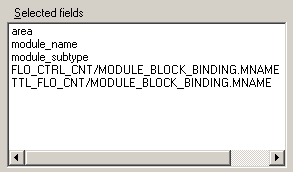
Select the MODULE_BLOCK_BINDING.MNAME field for both FLO_CTRL_CNT and TTL_FLO_CNT.
The Selected fields area of the Select fields dialog now looks like the following.
-
If the equipment module contains function blocks, include parameter shortcuts for block parameters you want to bulk edit.
-
Select items in the Format specification - Must exist dialog, if desired.
-
Click Finish to save the format specification file and close the dialog.