Follow these steps to create a template from the class, then create an instance of the module from the template.
-
Drag the TTLZER_CL equipment module class to a category under Module Templates.
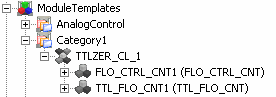
The Module Templates hierarchy should look similar to the following figure.
Note that the text in the parentheses next to the contained modules' name is the name of the contained modules in the TTLZER_CL class. To determine the class a module or template is based on, right-click the module or template and select Properties. The Class name field contains the class the module or template is based on.
-
Rename the module template TTLZER_CL_1 to TTLZER_TMP (for template).
-
Select TTLZER_TMP.
-
Select and change the SubType to TTLZER_TMP.
NoteThe Subtype must be entered in all capital letters. The user-defined import uses the Subtype to identify the module templates when it creates modules.
-
Rename FLO_CTRL_CNT1 to FLO_CTRL_TMP.
-
Set the FLO_CTRL_TMP module SubType to FLO_CTRL_TMP.
-
Rename TTL_FLO_CNT1 to TTL_FLO_TMP.
-
Set the TTL_FLO_TMP module SubType to TTL_FLO_TMP.
-
Create an instance of the template by dragging TTLZER_TMP to AREA_A.
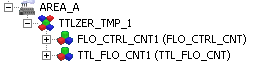
The AREA_A hierarchy now includes the instance:
-
Rename the module instances: