To create two new modules you must edit all three exported files. Editing the containing module is slightly different than editing the contained module so both are detailed below.
To bulk edit a contained module:
-
Use the DeltaV Bulk Edit menu to open FLOW_CONTROL.TXT.
-
Click OK on the Unicode Detected popup.
The file opens. Note that only the fields you specified in the format file appear as columns in the spreadsheet.
-
Copy line 2 of the spreadsheet and paste two copies back into the spreadsheet into lines 3 and 4.
-
In the area column, remove /TOTALIZER from all three copies, leaving only AREA_A.
-
In the module_name field, rename the three modules to FLOW_CONTROL-1, -2, and -3 respectively.
-
Edit any other parameters you exported as you require.
-
Use the DeltaV Bulk Edit menu to save FLOW_CONTROL_ASCII.TXT.
-
Click Save.
-
Click Yes to replace the existing copy of the file.
-
Close the spreadsheet but leave Excel and the Bulk Edit Add-in open.
-
Repeat steps 1 through 12 for TOTAL_FLOW.TXT, naming the three modules TOTAL_FLOW-1, -2, and -3.
To bulk edit a containing module:
-
Use the DeltaV Bulk Edit menu to open TOTALIZER.TXT.
-
Click OK on the Unicode Detected popup.
The file opens. Note that only the fields you specified in the format file appear as columns in the spreadsheet.
-
Copy line 2 of the spreadsheet and paste two copies back into the spreadsheet into lines 3 and 4 of the spreadsheet.
-
In the module_name column, rename the three modules to TOTALIZER-1, -2, and -3.
-
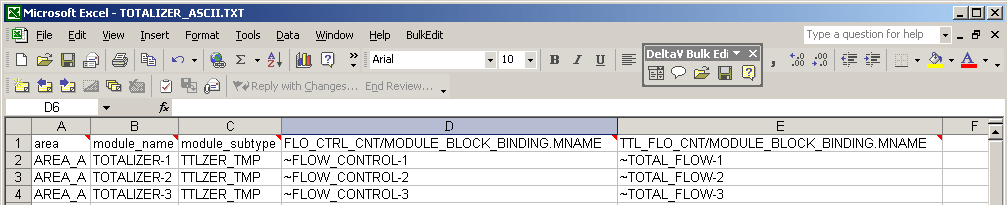
In the FLO_CTRL_CNT/MODULE_BLOCK_BINDING.MNAME column, change the three rows to ~FLOW_CONTROL-1, -2, and -3.
-
In the TTL_FLO_CNTB/MODULE_BLOCK_BINDING.MNAME column, change the three rows to ~TOTAL_FLOW-1, -2, and -3.
The spreadsheet should look like the following figure.
Steps 6 and 7 bind each of the TOTALIZER modules to specific instances of FLOW_CONTROL and TOTAL_FLOW created when you import the edited files. The tildes (~) at the beginning of each module name cause the bulk edit software to discard extra modules created during import. If you do not use the tildes an extra copy of all the contained modules remain in the hierarchy after import.
-
Edit other parameters if necessary.
-
Save TOTALIZER_ASCII.TXT from the DeltaV Bulk Edit menu.
-
Click Save.
-
Click Yes to replace the existing copy of the file.
-
Close the spreadsheet and close Excel unless you have more files to bulk edit.
You can also use Bulk Edit to move existing containing and contained modules, with some limitations.