You must export each module in the hierarchy individually.
To export a class-based module:
-
From DeltaV Explorer, select the FLOW_CONTROL module under TOTALIZER.
-
Select .
-
Click Next.
-
Click Next to acknowledge that you are exporting children of FLOW_CONTROL.
-
Select the check box by FLOW_CONTROL.
-
Click Next.
-
Browse to the FLOW_CONTROL.FMT format specification file.
-
Specify the target data file as FLOW_CONTROL.
-
Export the data.
-
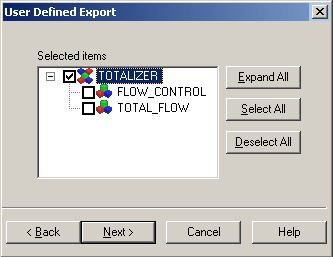
Repeat steps 1 through 9 for TOTAL_FLOW and TOTALIZER. When you export TOTALIZER select only the TOTALIZER module in the hierarchy diagram of the User Defined Export dialog as shown in the following figure.