Follow these steps to create a template, then create an instance of the module from the template.
-
In DeltaV Explorer, navigate to Library/Module Templates/AnalogControl.
-
Right-click and select New Module Template.
-
In the New dialog, name the template MASTER_CAS and make sure the Object type is set to Control Module or Template.
-
Click OK.
-
Right-click MASTER_CAS and select New Module Template.
-
In the New dialog, name the template SLAVE_CAS and make sure the Object type is set to Control Module or Template.
-
Click OK.
-
Right-click MASTER_CAS and select Properties.
-
In the SubType field of the Properties dialog, enter MASTER_CAS.
NoteThe Subtype must be entered in all capital letters. The user-defined import uses the Subtype to identify the module templates when it creates modules.
-
Right-click SLAVE_CAS and select Properties.
-
In the SubType field of the Properties dialog, enter SLAVE_CAS.
Again, use all capital letters.
-
Right-click SLAVE_CAS and select Open with Control Studio.
-
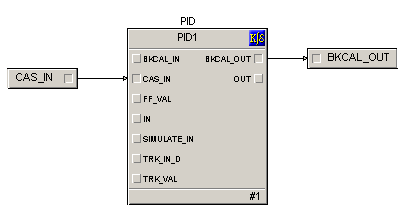
Configure the module to look like the following figure.
-
Perform any other configuration required, save the template, and close Control Studio.
-
Right-click MASTER_CAS and select Open with Control Studio.
-
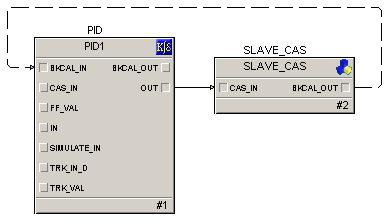
Configure the module to look like the following figure.
-
Perform any other configuration required, save the template, and close Control Studio.
-
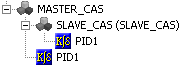
The MASTER_CAS and SLAVE_CAS templates should look like the following figure.
-
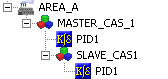
In DeltaV Explorer, drag the MASTER_CAS template to AREA_A.
AREA_A should look similar to the following figure.