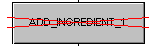
By disabling a step, you can stop the execution of an action in the step or prevent the action from executing (if the step has not become active yet). A disabled step is shown with a red X through the step. This indicates that the step does not cause actions to be evaluated. The following figure shows a disabled step.
Note that disabling a step does not affect the time periods associated with the individual actions. For example, an action with a Pulse action qualifier can only be evaluated on the first scan through the actions of an active step. When the step is disabled before it becomes active, any actions in that step that have a Pulse action qualifier are not evaluated.
Another example that illustrates this time period contingency within disabled steps involves the Delay action qualifier. When an action on a disabled step uses the Delay action qualifier with a 30-second delay, and the step is enabled 20 seconds after the step goes active, the action with the Delay qualifier must wait an additional 10 seconds before it is evaluated. Conversely, when the step becomes enabled after more than 30 seconds after the step goes active, the action must wait until the next scan to get evaluated.