Sometimes it is not practical to advance step-by-step from the beginning of a diagram until you reach the place where you think the problem is. The solution to this is the breakpoint. Using a breakpoint, you can tell the algorithm where to stop. The algorithm runs until it reaches a breakpoint, and then it stops.
When you set a breakpoint, a red circle indicates where the breakpoint is set. The following figure shows a function block with a breakpoint set.
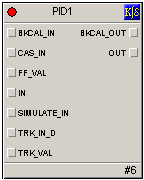
Remember to remove the breakpoint when you want the algorithm to execute normally.