You can stop a specific function block algorithm from executing in order to more closely examine the behavior. However, you do affect the currently running process when you stop the execution. Use extreme care when stopping execution. Once the execution is stopped, you can advance through a function block diagram and force input values to a particular value to watch the results and the behavior of the blocks.
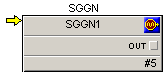
You can stop the execution by clicking from the pull-down menu or by setting a breakpoint (available in debug mode only). When the algorithm has stopped, a yellow arrow is displayed on the first block in the diagram. The arrow indicates the next block that will be executed.
 CAUTION!
Any changes you make online affect your process because the changes are made to downloaded modules in the controller. Use extreme care when changing values or stopping the execution of an algorithm.