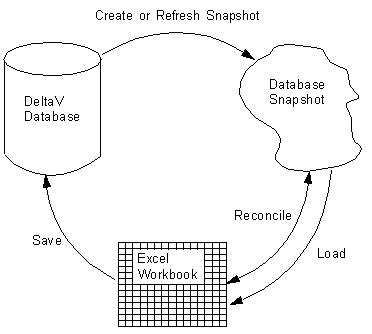
The Deltav_Xl_Support Add-in that creates this menu creates a local in-memory copy of the DeltaV database controller configuration (the Database Snapshot). The add-in manages and refreshes the snapshot based on your actions while you work in Excel. The add-in preserves the snapshot if you save the workbook before you close Excel. When you re-open Excel you can open the saved Database Snapshot.
The following figure and explanation are an overview of how this add-in works.
Note
On first use the add-in attempts to connect to the DeltaV database to generate a local copy of the relevant parts of the DeltaV library.