Alarm help syntax
The fields for alarm help are included in the fields for alarms. For example, the following figure shows the fields that are available when creating a format specification file for module alarms. The fields available for other types of alarms are different.
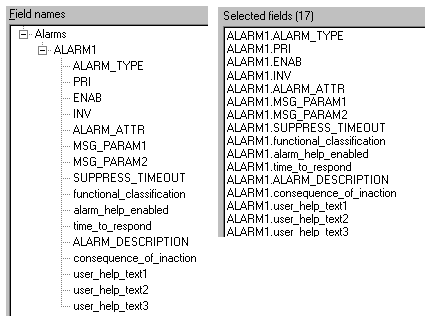
The following table shows the alarm help fields available for all alarms that support alarm help.
| Field Names | Valid Values | Required for Import |
|---|---|---|
|
functional_classification |
A number corresponding to a state in the dv_alm_function named set. |
No |
|
alarm_help_enabled |
T or F |
No |
|
time_to_respond |
A number corresponding to a state in the dv_alm_ttr named set. |
No |
|
ALARM_DESCRIPTION |
A description of the alarm. |
No |
|
consequence_of_inaction |
A number corresponding to a state in the dv_alm_coi named set. |
No |
|
user_help_text1 |
User configured text, 48 characters or fewer. |
No |
|
user_help_text2 |
User configured text, 48 characters or fewer. |
No |
|
user_help_text3 |
User configured text, 48 characters or fewer. |
No |
<NULL> Field Values
It is possible to have a large number of fields in an alarm help bulk edit file that are <NULL>. This is not a problem. In most cases it indicates that a particular alarm is not in the object. For example, if you use the Module_AlmHlp.fmt file to export alarm information, not every module has every alarm. Each line (module) in the bulk edit file contains <NULL> values for the alarms that the module does not contain.
Named Sets
Three fields in alarm help bulk edit files correspond to named sets. In the bulk edit export/import file, the named states in a named set are represented by their state values. In addition, the state names are configurable. The following table lists the alarm help bulk edit fields that correspond to named sets.
|
Field Name in Bulk Edit |
Corresponding Named Set |
|---|---|
|
functional_classification |
dv_alm_function |
|
consequence_of_inaction |
dv_alm_coi |
|
time_to_respond |
dv_alm_ttr |
The following three tables list the default state names and values for the three named sets.
Alarm Help across zones
Alarm Help is available across zones in read-only mode; it must be configured, or bulk-edited, in the system where the alarm originates. When using Alarm Help across zones, the named sets need to be identical in all systems to ensure that the Alarm Help labels are consistent across zones. The system does not force this consistency.