SmartPlant Excel Interface > Installing the add-in and Intergraph components

Install the SmartPlant Intergraph components

Note

To move data from the DeltaV system to the SmartPlant Instrumentation application you must have a SmartPlant Instrumentation version specified in SmartPlant Excel Interface.

When you install DeltaV software as recommended on a PC that does not include the SPI software, then you will need to install these Intergraph components. If DeltaV software and SPI are on the same machine then SPI installs these components as part of a major SPI software release. SPI  does not install the schema with a service pack. It is recommended that you install the Intergraph components on the same computer that has DeltaV software installed.

To install the Intergraph components:
  1. From Windows Explorer navigate to \DVData\SmartPlant\Foundation\v2014. 
  2. Double-click the setup.exe file.
  3. In the Intergraph install dialog accept the defaults.

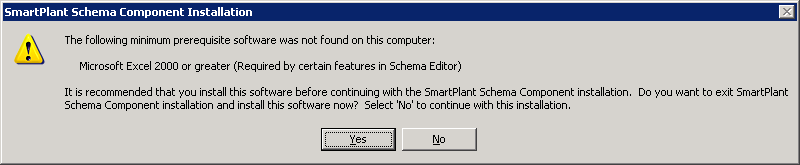
    The following message may appear.

    Ignore this message and click No to continue. 

  4. From Windows Explorer navigate to \DVData\SmartPlant\Foundation\Client\v2014. 
  5. Double-click  the setup.exe file.
  6. In the Intergraph install dialog accept the defaults.

The Intergraph components are installed as choices on the Windows Start menu.

Note

To install newer versions of the Intergraph components, you must first uninstall the existing components. From Control Panel select Programs and Features.