This section outlines a simple configuration example to show how to create a module to provide limited control of the Autronica panel in a DeltaV configuration. The example processes information from the BS-420 and sends commands to it.
The following figure shows an SIS Module running in any CSLS on the same Local Safety Network as the LSNG, or in a CSLS on a different LSN that is connected by a Logic Solver Network Bridges.
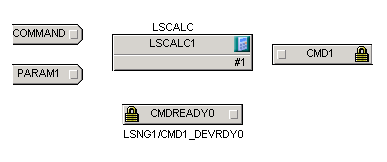
-
COMMAND and PARAM1 are internal read parameters that are 32-bit unsigned integers with status and they are used together to command the panel.
-
CMD1 is a Non-Boolean Secure Parameter of type 32-bit unsigned integer with status.
-
CMDREADY0 is a Boolean Secure Parameter Reference to the LSNG that is used as a handshake mechanism for writing commands to the device. The command ready logic is active low - a one means that the device is not ready to accept a command while a zero means that the device is ready to accept the next command.
IF (('^/COMMAND' != 0) AND ('^/CMDREADY0' = 0)) THEN
'^/CMD1' := '^/COMMAND' + (ROL('^/PARAM1' ,16));
ELSE
'^/CMD1' := 0;
'^/COMMAND' := 0;
ENDIF;
You can now use the PARAM1 and COMMAND parameters for limited control of the panel and detection units.
Controlling the BS-420 panel
To command the BS-420 panel, only the COMMAND parameter is required. The following table lists the command values supportedControlling Units
BS-420 units are controlled by first writing the Modbus Index of the unit (not the Modbus Address) to PARAM1 and then writing the appropriate value to COMMAND. Note that Modbus Indexes can be found in the AS Configuration Tool or in the exported Modbus Index file (.csv).
The following table lists the command values supported.