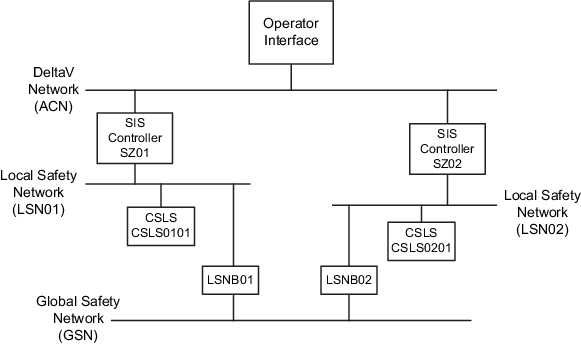
This document uses an example SIS CSLS DeltaV system to explain how to use DeltaV Virtual Studio (DVS) and DeltaV Explorer to create a DeltaV virtual system for logic checkout. The figure shows the example system used in this document. To simplify the diagram redundant networks are not shown.
The names used in the virtual system for hardware items must match exactly with the names used in the production system or CRCs in the virtual and production systems will differ.
The names inside the blocks of the diagram (SZ01, CSLS0101, and so on) are the hardware names that will appear in the DeltaV Explorer configuration for the virtual system and the production system.
The names in parentheses in the example diagram (LSN01, ACN) are the names of the virtual networks. These names do not appear in DeltaV Explorer but are created and used in DeltaV Virtual Studio to define the virtual networks.
This example system includes the use of Local Safety Network Bridges to create a Global Safety Network. If your system does not include LSNBs, you can ignore their mention in the remainder of this document.
The numbers in the names define the location of the item in the example system. The first pair in a name defines the LSN the item is in. The second pair of numbers in the CSLS names indicates which CSLS it is in the LSN. For example, CSLS0101 is the first CSLS on LSN01. In this example there is only one CSLS per LSN.
The host's time must be set to UTC time and not local time. This is because the virtual CSLSs get their initial time from the Host when the virtual machine starts.