WriteAsync function
DLSYS.WriteAsync() resolves the specified DeltaV parameter path and attempts to write the specified value.
This function returns a Promise object that waits until the parameter
field can be located and the value written. If the DeltaV parameter field
cannot be located or the value not written, the script execution pauses for a
maximum of 5 to 6 seconds while waiting for the Promise to resolve. If the
parameter field still cannot be located or the value still not written
successfully at the end of the allowed time, the Promise object returns a
WriteResult object with a
.Success value of False and an error message.
- Arguments
- 2
Argument Description path stringA literal or graphics expression that resolves to a DeltaV parameter.
The .STR suffix may be used, but it does not affect the value returned.
valueThe value to be written.
To minimize data conversions, Emerson recommends using the same data type as that of the RtValue object. String, number and Boolean data types are supported.
- Return values (Promise object that resolves to a Boolean)
- A Promise object that, when resolved, returns a WriteResult
object containing the status (
.Success) of the write attempt. If not resolved in the allowed time, returns an error message string (.ErrorMessage) describing the write failure. - Syntax
DLSYS.WriteAsync(path string, value)- Examples
-
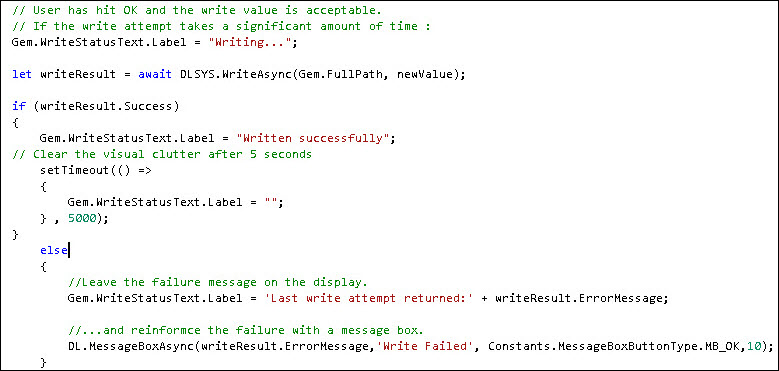
Example 1
-
If Electronic Signature is configured, then pressing Cancel on the Electronic Signature Confirm dialog causes writeResult to become undefined.
To prevent this issue from happening, you must include an additional if/else statement in the script (refer to Example 2).
Example 2