FFDEV_fp (Fieldbus device alarm faceplate)
Configuration view of the Fieldbus device alarm faceplate (FFDEV_fp)
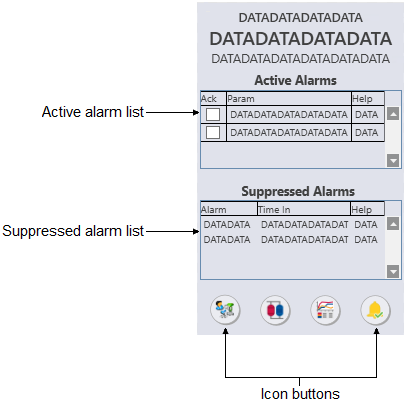
The FFDEV_fp is used to manage
alarms for mechanical and optimization assets that support PlantWeb alerts. The
following list describes the major components that are present on the FFDEV_fp.
- Alarm list (active)
-
Provides a condensed version of an alarm summary and scrollable list of the module's current active alarms.
- Ack column --> Shows the state of the alarm, which is
represented by one of the following symbols:
Alarm state Ack column Active/unacked Empty field Active/acked Check mark Inactive/unacked Empty box - Param column --> Shows the alarm name or parameter. The text and colors are as configured for the alarm's current state.
- Help column --> Indicates the type of Alarm Help available
for the corresponding alarm. The column contains one of the following icons:
Icon Description 
Alarm Help is enabled. 
Alarm Help is not enabled but the user has the privilege to edit Alarm Help. No icon Alarm Help is not enabled and the user does not have the privilege to edit Alarm Help, or the system does not have a license for alarm help.
- Ack column --> Shows the state of the alarm, which is
represented by one of the following symbols:
- Alarm list (suppressed)
- Provides a condensed version of an alarm summary and scrollable
list of the module's current suppressed alarms.
- Alarm --> Shows the name of the suppressed alarm.
- Time in --> Shows the time the alarm was suppressed.
- Help column --> Iindicates the type of Alarm Help available for the corresponding alarm. (See a description of these icons in the active alarm list description.)
- Icon buttons


