Common faceplate and detail display elements
Figure 1: Configuration view of common faceplate and detail display elements
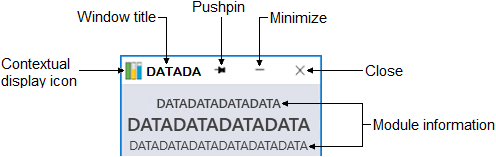
Title bar elements
- Contextual display icon
- Indicates whether this display is a faceplate or detail display.
- Window title
- Corresponds to the Graphics Studio Window Title property value for this contextual display.
- Pushpin
- If Contextual Display Pinning is enabled for the current DeltaV Live layout,
the pushpin appears on both faceplates and detail displays. On unpinned contextual displays, the
pushpins appear horizontal (
 ).
An unpinned contextual display is replaced when a new display of that type is
opened.
Clicking a horizontal pin changes a contextual display to the pinned
state.
).
An unpinned contextual display is replaced when a new display of that type is
opened.
Clicking a horizontal pin changes a contextual display to the pinned
state. - On pinned contextual displays, the pushpins
appear vertical (
 ).
Pinned contextual displays remain open until the user manually closes
them.
Clicking a vertical pin returns a contextual display to the unpinned
state.
).
Pinned contextual displays remain open until the user manually closes
them.
Clicking a vertical pin returns a contextual display to the unpinned
state. - Minimize
-
Minimizes the contextual display. When one or more contextual displays are minimized, an icon indicating the type of contextual display appears in the layout's menu bar. Click the icon to restore the contextual display. If multiple contextual displays are minimized, clicking the icon shows a list of the minimized displays of that type. Click a display from the list to restore it.
Pinned contextual displays can also be minimized.
- Close
- Closes the contextual display.
Module information
- Zone name
- If the faceplate or detail display contains an object in another zone, the zone name appears here.
- Tag
- The DeltaV database tag for the module/device/node associated with the faceplate or detail display.
- Description
- The user-configured description for the object. Descriptions do not appear on function blocks faceplates and detail displays.