DCC_fp (Discrete Control Condition function block faceplate)
The DCC_fp is used with the Discrete Control function block. This faceplate is divided into three tabs, with each tab listing the conditions configured for that type (Interlock, Permissive, or Force Setpoint), and showing information on each condition. Up to 16 conditions can be configured for each type.
The following sections describe the condition information and other components that may be present on each tab of the DCC_fp.
Interlocks tab
Configuration view of the Interlocks tab on the Discrete Control Condition function block faceplate (DCC_fp)
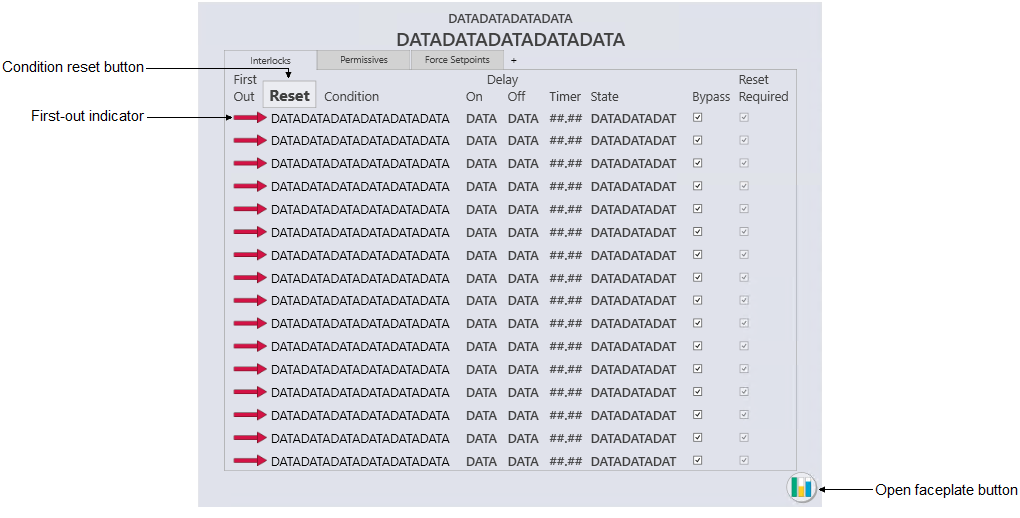
- Condition reset button
- This button is visible only when a condition requiring a reset becomes inactive.
- First-out indicator and conditions columns
-
- First-out
- A red arrow indicates that this condition was the first condition that evaluated to True.
- Condition
- Shows the configured description for the condition. When the condition is inactive, the description text is shown as light gray.
- Delay On
- Shows the time configured to delay the output of the condition when it evaluates to True.
- Delay Off
- Shows the time configured to delay the output of the condition when it evaluates to False.
- Timer
- Shows the Delay On or Delay Off time remaining after a condition's state changes.
- State
- Shows the state to interlock to when the condition is True.
- Bypass
- A check mark indicates that the condition has been bypassed.
- Reset Required
- A check mark indicates that a reset is necessary to unlatch the condition after the condition's expression evaluates to False. This check box is read-only.
- Faceplate button
- Opens the module faceplate display.
Permissives tab
Configuration view of the Permissives tab on the Discrete Control Condition function block faceplate (DCC_fp)
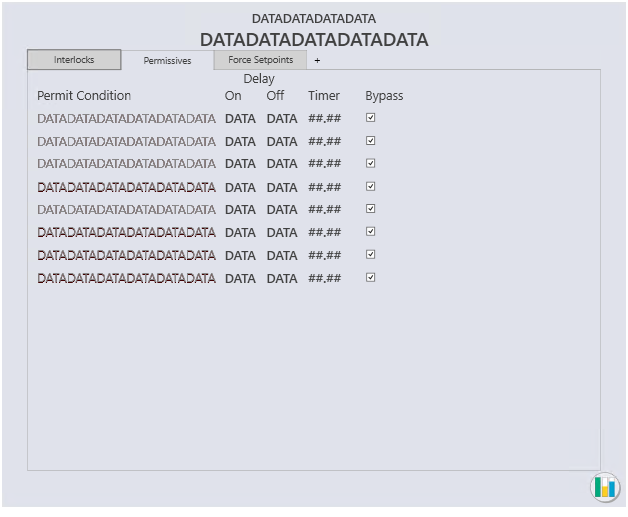
- Condition
- Shows the configured description for the condition. When the condition is inactive, the description text is shown as light gray.
- Delay On
- Shows the time configured to delay the output of the condition when it evaluates to True.
- Delay Off
- Shows the time configured to delay the output of the condition when it evaluates to False.
- Timer
- Shows the Delay On or Delay Off time remaining after a condition's state changes.
- Bypass
- A check mark indicates that the condition has been bypassed.
Force Setpoints tab
Configuration view of the Force Setpoints tab on the Discrete Control Condition function block faceplate (DCC_fp)
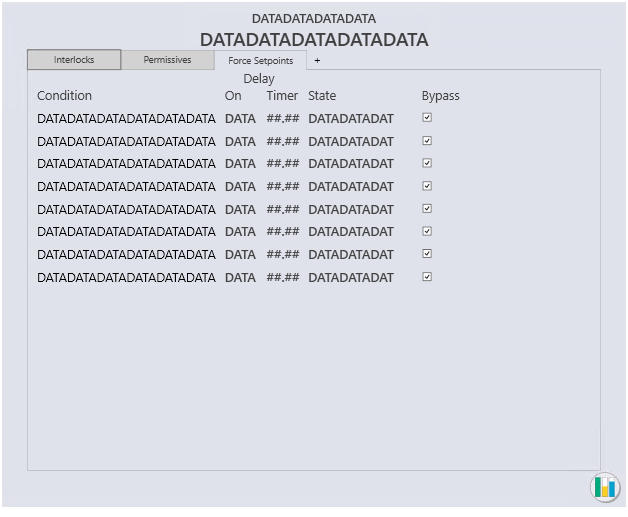
- Condition
- Shows the configured description for the condition. When the condition is inactive, the description text is shown as light gray.
- Delay On
- Shows the time configured to delay the output of the condition when it evaluates to True.
- Timer
- Shows the Delay On or Delay Off time remaining after a condition's state changes.
- State
- Shows the state to interlock to when the condition is True.
- Bypass
- A check mark indicates that the condition has been bypassed.