INSPECT_Block_1_ GEM class
INSPECT_Block_1_ GEM
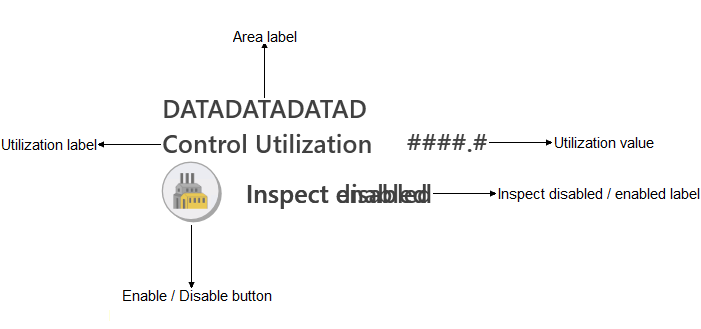
The INSPECT GEM, along with the INSPECT function block, provides a means for operators to interact with InSight.
Use the INSPECT GEM in the DeltaV system to include InSight utilization calculation results in operator displays. Once the INSPECT GEM is added to a display, you can enter the tag of an Inspect block in the Graphics Configuration pane. The GEM also shows the area over which the calculations are made and includes a button operators can use to enable and disable the calculations for the area.
The following list describes
the components that may be present on an INSPECT _Block_1_ GEM:
- Area label
- Shows the name of the area for which the calculations are made.
- Utilization value
- Shows the value of the utilization calculation for the modules in the area.
- Enable / disable label
- Indicates whether the calculations for the area are enabled or disabled.
- Enable / disable button
- Click to enable or disable the calculations for the area.