HP_Alarms GEM class (High Performance unit alarms indicator)
HP_Alarms GEM
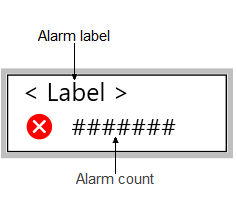
This GEM is used to configure alarm rollup calculations and shows alarm count information on running displays.
Alarm rollups can be configured in modules matching the normal breakdown of Area > Unit > Equipment Module > Module, or they can be customized for modules that do not match the normal breakdown of Area > Unit > Equipment Module > Module.
If you choose to customize your alarm
rollup, you must use Control Studio to configure the control module that will
perform the alarm calculations. Using a CALC block, add the following code to the
module:
Pn := 255;
Cn := 0;
Nn := 0;
Count := 0;

Pt := '//MODULE/ALARMS[1].PRI';
Ct := '//MODULE/ALARMS[1].CUALM';
Nt := '//MODULE/ALARMS[1].NALM';
IF ((Nt > Nn) OR (Ct * (Cn - 1) < 0) OR ((Nt = Nn) AND ((Ct != 0)=(Cn != 0)) AND (Pt > Pn))) THEN
Pn := Pt;
Cn := Ct;
Nn := Nt;
Count := Count + 1;
ELSE
IF (Nt > 0) OR (Ct > 0) THEN
Count := Count + 1;
END_IF;
END_IF;


'^/PRI' := Pn;
'^/CUALM' := Cn;
'^/COUNT' := Count;
'^/NALM' := Nn;