The General page shows a summary of diagnostic information returned from the selected Profibus device.
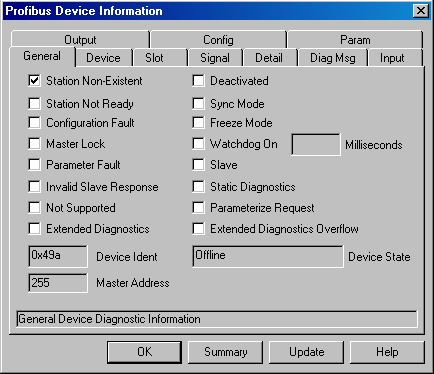
Station Non-Existent
Checked if the Profibus port (the Profibus master) has been configured to expect the selected device at that address but cannot find that device.
Station Not Ready
Checked if the selected device is not ready to transfer data.
Configuration Fault
Checked if the selected device cannot validate the configuration data that the Profibus master (Profibus port) sent to it.
Master Lock
Checked if the Profibus master (Profibus port) has been configured to communicate with the selected device but the device reports that it has received parameters from another Profibus master.
Parameter Fault
Checked if the last set of parameters sent to the selected device were not correct.
Invalid Slave Response
Checked if the Profibus master (Profibus port) receives an invalid response from the selected device.
Not Supported
Checked if the Profibus master (Profibus port) requests some functionality from the selected device and the device configuration does not support the functionality.
Extended Diagnostics
Checked if the selected device returns device specific diagnostic data. DeltaV Diagnostics attempts to interpret this data on the Device, Slot, and Signal pages of this dialog.
Deactivated
Not used in the DeltaV System.
Sync Mode
Not used in the DeltaV System.
Freeze Mode
Not used in the DeltaV System.
Watchdog On
Checked if the selected device has been configured to start its watchdog timer. The Watchdog Timer specifies the amount of time before the device goes into its fail safe mode if communication on the network stops.
Milliseconds
The amount of time before the device goes into its fail safe mode if communication on the network stops. This is the Watchdog Timer configured for the device.
Slave
Always checked. The selected device is configured as a Profibus slave device.
Static Diagnostics
Checked if certain conditions occur for the selected Profibus device. For example, if the device is unable to provide valid data to the Profibus master.
Parameterize Request
Checked when the selected device needs parameters and configuration from the Profibus master.
Extended Diagnostics Overflow
Checked when the selected device has more diagnostic information than it is capable of sending.
Device Ident
Identifies the type of device.
Master Address
The address of the Profibus master of the selected device.
Device State
Returned by the Profibus master to indicated the state of the selected device.
Summary Button
Opens a dialog that contains a summary of all the information from each page of the Profibus Device Information dialog. You can print the summary (for FAX or mail) and save it to a text file (for e-mail).
Update Button
Updates all pages with the latest information from the device.