You can use the Action function block to implement complex calculations, signal conditioning, or functionality that is not available in the standard function blocks. You can use trigonometric, exponential, and power functions, as well as standard mathematical operations.
Application Example - Force Auto Control
Assume you have a tank that can be filled by up to three pumps with different ingredients. The following figure shows an example of this process:
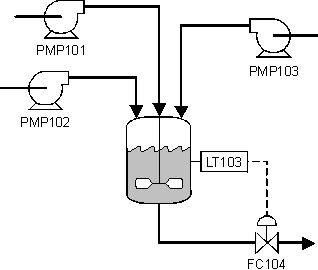
Assume you want the operator to be able to choose to run the tank level controller in Auto or Man mode when one or two ingredients are being pumped. However, when three ingredients are being pumped, you want the tank level controller to be forced to Auto mode at a predefined setpoint of 95%. You use two Action function blocks to enforce these requirements, as shown in the following function block diagram:
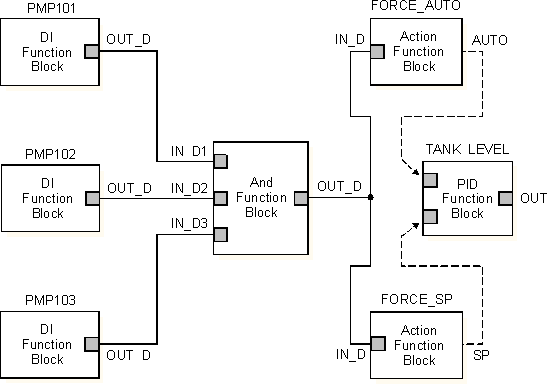
When all three pumps are on, the output of the And function block is True (1). This triggers the two Action blocks to execute their expressions. You configure the following expression in the FORCE_AUTO Action block to set the TANK_LEVEL PID controller target mode to Auto:
'/TANK_LEVEL/MODE.TARGET' := AUTO;
You configure the following expression in the FORCE_SP Action block to set the TANK_LEVEL PID controller setpoint to 95%:
'/TANK_LEVEL/SP.CV' := 95.0;
The Action function block expressions continue to execute as long as all three pumps are running and any operator attempt to change the TANK_LEVEL controller mode or setpoint is overridden.