The following diagram shows the timed response of the Analog Input function block:
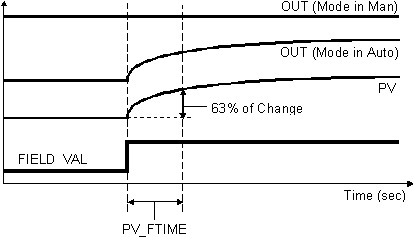
You select the manner of processing the analog measurement value by configuring the I/O selection, signal conversion, and filtering parameters.
I/O selection
When you configure the Analog Input function block, you select the I/O channel associated with an analog measurement by configuring the Device Signal Tag (DST) of the IO_IN parameter. You select the Device Tag and the parameter the AI block accesses on that channel.
HART_DV_SLOT0 — the slot 0 device variable value. This value is read digitally.
HART_DV_SLOT1 — the slot 1 device variable value. This value is read digitally.
HART_DV_SLOT2 — the slot 2 device variable value. This value is read digitally.
HART_DV_SLOT3 — the slot 3 device variable value. This value is read digitally.
HART_FIELD_VAL — the 4 to 20 mA signal of the HART transmitter, in the range and engineering units defined by XD_SCALE or OUT_SCALE, depending on L_TYPE. HART Status is applied. The range and units are automatically sent to the transmitter to set its range and units. The specified units must be supported by the transmitter.
HART_PV — the Primary Variable of a HART transmitter, in engineering units. This value is read digitally.
HART_SV — the Secondary Variable of a HART transmitter, in engineering units. This value is read digitally.
HART_TV — the Tertiary Variable of a HART transmitter, in engineering units. This value is read digitally.
HART_FV — the Fourth Variable of a HART transmitter, in engineering units. This value is read digitally.
The HART_DV_SLOT[0-3] channel parameters are not supported in devices implementing the HART Protocol prior to revision 7. Therefore, you should not configure one of these channel parameters for a device that implements an earlier level of the HART protocol.
You can configure anti-aliasing filtering, NAMUR limit detection, and overrange/underrange detection for the channel parameters. For information on these capabilities, refer to the I/O configuration topic.
Simulation
To support testing, you can enable simulation. This allows the measurement value and status to be supplied manually or from another block.
When the block is downloaded to a controller, enabling SIMULATE sets the Simulate Active bit in the BLOCK_ERR parameter. When the block is downloaded to a workstation the Simulate Active bit is not set.
During configuration, decide whether you want the simulated value/status to be entered manually during operation or you will use a value/status from another block for the simulated value/status.
When the value is entered manually:
-
The operator first enables simulation by selecting the SIMULATE parameter and setting the Simulate Enabled check box in the Simulate Enabled/Disabled field. In online operation, the operator can enter a simulated status value in the Simulate Status field.
-
If SIMULATE_IN is not connected (status = Bad: NotConnected), the SIMULATE value is used.
-
If SIMULATE_IN has any status except Bad: NotConnected, the SIMULATE_IN value is used. In this case, the SIMULATE_IN value always overrides the SIMULATE value.
Use the SIMULATE parameter to enter values manually and make sure SIMULATE_IN is not connected. If SIMULATE_IN is connected or a value is entered manually into SIMULATE_IN, the SIMULATE_IN value overrides the SIMULATE value.
When the value/status from another block is used:
-
During configuration, connect SIMULATE_IN to the desired block output or parameter. Do not enter a value in the Simulate Value field of the SIMULATE_IN input; the block uses the connected value automatically.
-
During operation, the operator enables simulation by selecting the SIMULATE parameter and setting the Simulate Enabled box in the Simulate Enabled/Disabled field.
Do not enter a value for the SIMULATE_IN parameter. If you do and the status of SIMULATE_IN is not Bad: NotConnected, the manually entered value for SIMULATE_IN overrides any value you enter in SIMULATE.
Signal conversion
Direct signal conditioning — simply passes through the accessed channel input value (or the simulated value when simulation is enabled). For direct conversion, OUT_SCALE is written to XD_SCALE in controller-resident blocks.
Indirect signal conditioning — linearly converts the accessed channel input value (or the simulated value when simulation is enabled) from its specified range (XD_SCALE) to the range and units of the PV and OUT parameters (OUT_SCALE).
Indirect square root signal conditioning — converts the accessed channel input value (or the simulated value when simulation is enabled) from its specified range (XD_SCALE) by taking the square root of the value and scaling it to the range and units of the PV and OUT parameters (OUT_SCALE). If the input value is less than zero, signal conditioning stops and the input value is passed directly to the output.
Direct independent signal conditioning — simply passes through the accessed channel input values (or the simulated value when simulation is enabled). OUT_SCALE is independent of XD_SCALE.
You view the accessed value (in percent of XD_SCALE) through the FIELD_VAL parameter.
When the converted input value is below the limit specified by the LOW_CUT parameter and the Low Cutoff I/O option (IO_OPTS) is enabled (True), a value of zero is used for the converted value (PV). This option can be useful with zero-based measurement devices, such as flowmeters.
You can set the I/O option in Manual or Out of Service mode only.
Filtering
You apply filtering to the converted value (PV) by specifying the filter time constant (in seconds) in the PV_FTIME parameter. When you specify a value of zero, no filtering is applied.
Block errors
Block configuration error — The block is wired to a HART channel and the HART device indicates that the function block's units are not compatible with the device. In this case, the Out of Service block error is also set.
Simulate active — Simulation is enabled and the block is using a simulated value in its execution.
Input failure/process variable has Bad status — The source of the block's process variable is bad. Indicates a hardware failure, a non-existent Device Signal Tag (DST), or a Bad status on the SIMULATE parameter.
Out of Service — The block is in Out of Service (OOS) mode.