The following diagram shows the timed response of the Analog Output function block.
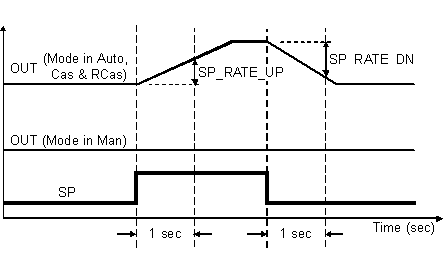
You select the manner of processing the SP and the channel output value by configuring setpoint limiting options, tracking options, and conversion and status calculations.
Setpoint limit scaling
During download SP_HI_LIM and SP_LO_LIM are set to their configured values. If you have not changed these values from their defaults they are set as follows during the first execution of the block:
During runtime the limits are restricted as follows:
-
SP_HI_LIM is restricted to PV_SCALE(EU100) + 0.1 ×( PV_SCALE(EU100) - PV_SCALE(EU0)).
-
SP_LO_LIM is restricted to PV_SCALE(EU0) - 0.1 × (PV_SCALE(EU100) - PV_SCALE(EU0)).
If the new scale causes a limit to be outside of these rules, DeltaV software forces the limit within the rules.
The SP parameter is not changed as a result of changing the scale or limits. However, the algorithm might change SP on the next execution of the block.
Setpoint selection and limiting
You use the MODE parameter to select the source of the SP value. In Automatic (Auto) mode, the local, manually entered SP is used. In Cascade (Cas) mode, the SP comes from another block through the CAS_IN input connector. The range and units of the SP are defined by the PV_SCALE parameter.
This option is enabled (True) as a default. SP becomes a copy of PV when the block's target mode is Man. A manually entered SP value is overwritten on the block's next execution cycle. You can disable this option in Man or OOS mode only.
The SP value is limited to the range defined by the setpoint high limit parameter (SP_HI_LIM) and the setpoint low limit parameter (SP_LO_LIM).
In Auto mode, the rate at which a change in the SP is passed to OUT is limited by the values of the setpoint upward rate limit parameter (SP_RATE_UP) and the setpoint downward rate limit parameter (SP_RATE_DN). A limit of zero prevents rate limiting, even in Auto mode.
Conversion and status calculation
The converted percent value is inverted and stored in the OUT parameter, except in Man mode. In Man mode, the OUT parameter is set manually.
The OUT value is used to set the analog output or the pulse discrete output of the I/O channel defined by the IO_OUT parameter.
You access the actuator position analog input that is associated with the output channel through the IO_READBACK parameter. The channel input is shown in the READBACK parameter (in percent) and in the PV parameter (in engineering units). When no input channel is defined, the PV and READBACK values are based on the OUT parameter.
You can set I/O options in Manual or Out of Service mode only.
Scaling for HART and Fieldbus devices
XD_SCALE converts the displayed value of OUT to engineering units when the channel or port for IO_OUT is HART Analog output or fieldbus.
For DVC4000/5000 series Fisher valves, you cannot write a value to XD_SCALE while the device is active. This causes a mismatch between the device and the configuration. You must take the device out of service before it can accept an XD_SCALE change.
Simulation
When simulation is enabled, the last value of OUT is maintained and is reflected in the field value of the SIMULATE parameter. In this case, the PV and READBACK values and statuses are based on the SIMULATE value and status you enter.
Initial value and failure action
FAIL_ACTION_MODE — Controls the behavior of the channel when the card goes into failure action condition due to lost communication with the controller. You can configure the channel to hold the value at the start of the failure action condition or to go to the failure action value (FAIL_ACTION_VAL).
FAIL_ACTION_VAL — The value the channel transitions to when the card goes into failure action condition, in percent. This value is used only when FAIL_ACTION_MODE is configured to set the value to FAIL_ACTION_VAL.
INIT_VAL — the value (in percent) that the channel goes to upon initial download before any function block action drives the output.
Block errors
Block configuration error - The block is wired to a HART channel and the HART device indicates that the function block's units are not compatible with the device. In this case, the Out of Service block error is also set.
Input failure/process variable has Bad status — The source of the block's process variable is bad. Indicates a hardware failure, a non-existent Device Signal Tag (DST), or a Bad status on the SIMULATE parameter.
Out of Service — The block is in Out of Service (OOS) mode.
Output failure — The write to the output failed or the DST is bad.
Readback failed — The I/O readback failed.
Simulate active — Simulation is enabled and the block is using a simulated value in its execution.
I/O readback options
HART_DV_SLOT0 — the slot 0 device variable value. This value is read digitally.
HART_DV_SLOT1 — the slot 1 device variable value. This value is read digitally.
HART_DV_SLOT2 — the slot 2 device variable value. This value is read digitally.
HART_DV_SLOT3 — the slot 3 device variable value. This value is read digitally.
HART_PV — the Primary Variable of a HART transmitter, in engineering units. This value is read digitally.
HART_SV — the Secondary Variable of a HART transmitter, in engineering units. This value is read digitally.
HART_TV — the Tertiary Variable of a HART transmitter, in engineering units. This value is read digitally.
HART_FV — the Fourth Variable of a HART transmitter, in engineering units. This value is read digitally.
OUT — the current value driven to the card, in percent, and the fieldbus status of the output channel.