The block computes the output value (OUT) as follows:

There are two ways to modify the input. Either offset the input from its original value by a specific amount or scale the input. The following figure illustrates each of these cases for a single input. The figure shows the two methods of modification separately. However, these methods can be combined so that Bias/Gain delivers scaling and offset together.
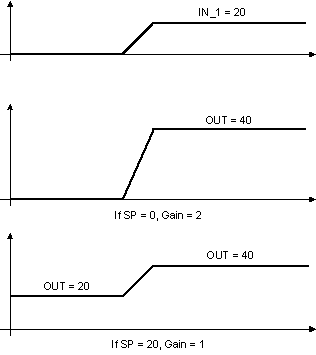
SP offsets the input by a given amount, and GAIN scales the modified input. In the first example in the above figure, SP is 0, and OUT is GAIN × IN_1. However, in the second example, SP has a non-zero value, and GAIN is set to 1 (no scaling). Therefore, OUT is IN_1 + SP.
To pass the input directly through unchanged, set SP = 0 and GAIN = 1.
Tracking
You specify output tracking with control options and parameters.
The Track Enable control option (CONTROL_OPTS) must be True for the track function to operate. When the Track in Manual control option is True, tracking can be activated and maintained when the block is in Man mode. When Track in Manual is False, the operator might override the tracking function when the block is in Man mode. Activating the track function causes the block's actual mode to go to Local Override (LO). You can set control options in Manual or Out of Service mode only.
The tracking value parameter (TRK_VAL) specifies the value to be converted and tracked into the output when the track function is operating. The tracking scale parameter (TRK_SCALE) specifies the range of TRK_VAL.
When the track control parameter (TRK_IN_D) is True and the Track Enable control option is True, the TRK_VAL input is converted to the appropriate value and output in units of OUT_SCALE.
Setpoint limiting
You limit the setpoint by configuring the SP_HI_LIM and SP_LO_LIM parameters. You limit the rate of change of the setpoint by configuring the SP_RATE_UP and SP_RATE_DN parameters. The value of the setpoint after limiting is shown in the working setpoint (SP_WRK) parameter.
Output limit constraints
During download OUT_HI_LIM and OUT_LO_LIM are set to their configured values. If you have not changed these values from their defaults OUT_HI_LIM and OUT_LO_LIM are set as follow during the first execution of the block:
-
OUT_HI_LIM is set to OUT_SCALE(EU100) + 0.1 × (OUT_SCALE(EU100) - OUT_SCALE(EU0)).
-
OUT_LO_LIM is set to OUT_SCALE(EU0) - 0.1 × (OUT_SCALE(EU100) - OUT_SCALE(EU0)).
The limits are restricted to these values.
The OUT parameter is not immediately changed as a result of changing the scale or limits. However, if OUT violates the new limits, the algorithm changes OUT on the subsequent execution to satisfy the new limits if required.
Output selection and limiting
Output selection is determined by mode. In an automatic control mode, the output is computed by bias/gain control. In Man mode, the output can be entered manually. In LO mode the output is determined by TRK_VAL and its scaling.
You limit the output by configuring the OUT_HI_LIM and OUT_LO_LIM parameters.
Bumpless transfer on mode transitions
The BAL_TIME parameter determines bumpless transfer operations. When the mode transitions from a non-automatic mode to an automatic mode, an internal balancing bias is calculated that maintains OUT. The internal bias is then ramped to zero over a period of time specified by BAL_TIME. When BAL_TIME is zero, the internal bias and ramp to 0 (zero) are not applied. When BAL_TIME is non-zero, the internal bias and ramp to 0 are applied.
When ACT_ON_IR in CONTROL_OPTS is chosen the setpoint is back calculated for bumpless transfer on transition from a non-automatic to an automatic mode. Since the SP could be outside the SP limits, and therefore a bump is possible, it is wise to have a non-zero BAL_TIME to cushion or ramp the bump as described in the previous paragraph.
Block errors