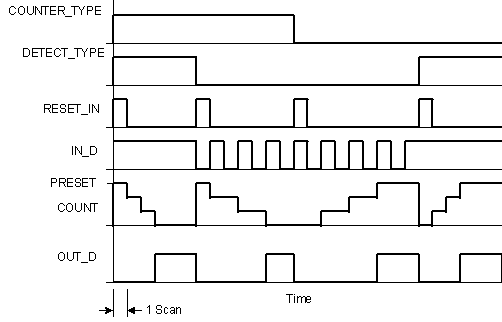
You select the counter type by configuring the COUNTER_TYPE and DETECT_TYPE parameters. The COUNTER_TYPE parameter defines the type of counter (increment or decrement). The DETECT_TYPE parameter defines the transition count type.
When COUNTER_TYPE is Up Counter (False or 0):
COUNT increases from zero based on IN_D.
When COUNT is greater than or equal to the PRESET parameter value, OUT_D is set True and COUNT holds its value.
When RESET_IN is True, COUNT is set to zero and OUT_D is set False.
When COUNTER_TYPE is Down Counter (True or 1):
COUNT decreases from PRESET based on IN_D.
When COUNT is less than or equal to zero, OUT_D is set True and COUNT holds its value.
When RESET_IN is True, COUNT is set to PRESET and OUT_D is set False.
When DETECT_TYPE is Count on Rising Edge (False or 0):
When DETECT_TYPE is Count on TRUE (True or 1):
The counter increments every scan that IN_D remains True. The counter value is represented in the COUNT parameter.
Each time COUNTER_TYPE or DETECT_TYPE is changed, the RESET_IN input is set True for one scan to reset the counter.
The following figure shows the timed response of the Counter function block for different input and parameter values: