The Date Time Event function block can be used in several ways.
Example 1
Set the DTE Timer to activate its OUT_D parameter true every day at 5:00 AM local time, starting on September 14, 2020 (the date/time must be in the future).
The function block diagram for the example looks like:
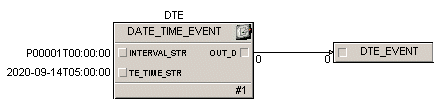
The supporting Calc block expressions for the example are:
'/DATE_TIME_EVENT/INTERVAL_STR' := "P00001T00:00:00";
'/DATE_TIME_EVENT/ENABLE' := true;
'/DATE_TIME_EVENT/TE_TIME_STR' := "2020-09-14T05:00:00";
Example 2
Set a timer to output true every day at 5:00 AM local time for a duration of 60 seconds, starting on September 14, 2020 (the date/time must be in the future).
The function block diagram for the example looks like:

The supporting Calc block expressions are:
'/DATE_TIME_EVENT/INTERVAL_STR' := "P00001T00:00:00";
'/DATE_TIME_EVENT/ENABLE' := true;
'/DATE_TIME_EVENT/TE_TIME_STR' := "2020-09-14T05:00:00";
Example 3
Set the DTE Timer to activate its OUT_D parameter true one time at 8:55 AM local time on December 9, 2020 (the date/time must be in the future).
The function block diagram would be similar to that for Example1. The supporting Calc block expressions are:
'/DATE_TIME_EVENT/INTERVAL_STR' := "P00000T00:00:00";
'/DATE_TIME_EVENT/ENABLE' := true;
'/DATE_TIME_EVENT/TE_TIME_STR' := "2020-12-09T08:55:00";
Example 4
Use the DTE Timer to display the local time of day in a module variable.
Use the following Calc block expression to assign the current local time to an input parameter in the module:
'/ISO_TIMESTAMP' := '/DATE_TIME_EVENT/LOCAL_TIME_STR';