The Device Control function block acquires the setpoint (requested state) and determines whether a transition to a new state is required. Next, the block reads the state of the physical device (feedback state) and compares it to the setpoint. The state of the device controller (DC_STATE) is determined from this comparison, and a failure is generated when the DC_STATE does not match the setpoint. Finally, the output state is calculated and written.
You assign inputs and outputs that correspond to your discrete hardware connections, and you configure state masks that define the expected or desired input/output values for different states. You can assign as many as four feedback signals to monitor field device operation.
You can select setpoint tracking, simulation, and/or control logic options to customize the block for your particular device, such as a pneumatic valve, motorized valve, or other motor.
Determining the command setpoint (requested state)
The block must first calculate its setpoint (SP_D) based on the following logic:
-
When the mode is Cascade (Cas), the setpoint is copied from CAS_IN_D.
-
When the mode is Automatic (Auto), the setpoint remains where it was left at the last execution of the block or at the last operator entry. Next, if the tracking parameter (TRK_IN_D) is True, the actual mode is changed to Local Override (LO) and the output (OUT_D) is copied from the field confirm value (FV_D) when it is in a valid state (not Undefined). If the SP Track device option is True in this case, the setpoint is copied from the output (OUT_D).
-
When the SP Track device option is True and the actual mode is LO due to an interlock or shutdown condition, the setpoint is copied from the output (OUT_D).
You can select the Passive on Active Timeout device option to cause the OUT_D output to be changed to the Passive state during the execution of the block when the Active confirm timer parameter times out.
In addition, you can select the Trip device option. When the Trip device option is True and an active confirm is lost for a time greater than the trip time parameter (TRIP_TIME), OUT_D is set to the Passive state. The SP_D value must be changed to Passive to clear the tripped condition.
Determining if a transition is required
The setpoint is used next by the logic that determines the device controller state (DC_STATE) to see whether or not a transition to another state is required. A Passive state setpoint always causes the output to be Passive. An Active state setpoint does not necessarily cause the output to go to the desired state.
You can select the Permissive device option if you want a permissive to be required before the state changes. When the Permissive device option is True, the PERMISSIVE_D input must be True for an Active state setpoint to change the DC_STATE to that Active state. However, PERMISSIVE_D does not have to be True before SP_D can be changed to an Active state.
PERMISSIVE_D has no further effect once DC_STATE is in an Active state. When DC_STATE changes away from the Active state, PERMISSIVE_D must be True to return to that state, even if SP_D has not changed.
Delaying setpoint changes
When the value of DELAY_TIME is not zero, a change in setpoint from the Confirmed Passive state to an Active state is delayed for DELAY_TIME seconds (using the DELAY_TIMER) before it is sent to the logic that determines DC_STATE. This allows a common external setpoint to cause a sequenced start of a group of motors.
When the value of RESTART_TIME is not zero, a change in setpoint when the Device Control block is not in the Confirmed Passive state is delayed for the time specified in the RESTART_TIME parameter (using DELAY_TIMER). The value of OUT_D is held at the Passive state while DELAY_TIMER is active. This allows time for a motor to stop before reversing direction, or for a compressor to unload before restarting.
DELAY_TIMER is set to the delay or restart time at the beginning of the interval and decreases to zero. You can see the time remaining for the delay or restart to be complete in the DELAY_TIMER parameter value.
Determining the physical device state (feedback state)
The state of the physical device must be reported back to the device controller so that it can be compared to the setpoint. This feedback state is shown in the FV_D parameter. The use of binary discrete inputs to determine FV_D is described in the Assigning I/O section below.
It is possible for the state to be Undefined when the device is moving between steady states. You can specify the maximum amount of time that the state can be Undefined before declaring the move to be a failure by configuring the following parameters:
-
CFM_ACT1_TIME is the maximum time allowed to transition to the Active 1 state.
-
CFM_ACT2_TIME is the maximum time allowed to transition to the Active 2 state.
-
CFM_PASS_TIME is the maximum time allowed to transition to the Passive state.
Timing takes place in the TRAVEL_TIMER (Travel is the term used to describe the movement of a valve from one end of its stroke to the other.). This timer is reset to zero at the start of the transition and increases in value until the device is confirmed or the confirm time has expired. The travel time is left in the timer until the next transition occurs so you can gather statistics for a preventive maintenance program.
Some valves take a long time to travel. When a valve begins to open, it is said to crack. You set CRACK_TIME to the longest time it should take to lose the confirm signal for the previous state. This is much shorter than the travel time, so it gives the operator an early warning that the valve is not moving. This time appears in CRACK_TIMER, which increases in value and holds the time until the next transition.
Generally, a device takes a finite amount of time to arrive at a newly commanded state. The Device Control function block supports and tracks these transitions with the DC_STATE parameter. DC_STATE represents the current state of the device. The following table lists the index values for DC_STATE.
|
Type of State |
DC_STATE Index |
Meaning |
|---|---|---|
|
Steady States |
0 |
Confirmed Passive |
|
1 |
Confirmed Active 1 |
|
|
2 |
Confirmed Active 2 |
|
|
Transient States |
3 |
Going to Passive |
|
4 |
Going to Active 1 |
|
|
5 |
Going to Active 2 |
|
|
Failure States |
6 |
Failed Passive |
|
7 |
Failed Active 1 |
|
|
8 |
Failed Active 2 |
|
|
Special States |
9 |
Tripped |
|
10 |
Shutdown/Interlocked |
|
|
11 |
Locked |
The PV_D value is used to determine DC_STATE. PV_D is normally a copy of FV_D. However, sometimes the hardware that confirms the device state fails. In this case, the operator can confirm the state of the field device visually. When the field device is in the correct state, the operator can turn on the accept switch (ACCEPT_D = True).
When ACCEPT_D transitions from False to True, PV_D is copied from OUT_D and is held there until OUT_D changes state. You can configure graphic displays and process control logic to use PV_D as the confirm state even when a confirm switch fails. The operator can turn off the visual confirmation by changing SP_D or by manually setting ACCEPT_D to False.
Determining the Device Controller state (DC_STATE)
In general, the effect of a change in setpoint is to change the state of the device controller (shown by DC_STATE) to one of the three normal steady states: Passive, Active 1, or Active 2. However, there are other possible states.
-
Three transient states corresponding to the transitions between steady states
-
Three failure states corresponding to loss of confirm for a steady state or to failure to complete a transition to that state within the time allowed
-
Three special states
You can select the Interlock device option. When the Interlock device option is True, the INTERLOCK_D input must be True for DC_STATE to remain in an Active state. When INTERLOCK_D transitions to False:
-
The actual mode is changed to LO
-
DC_STATE is changed to Shutdown/Interlocked
-
OUT_D is set to the Passive state
When INTERLOCK_D becomes True again, DC_STATE might return to its former state if the SP Track device option is False. There is no delay on the return.
When the SHUTDOWN_D input becomes True, the same thing happens as described above for loss of the interlock input. This is not optional.
When you have motor starters with overload protection that must be reset manually, you might want to ensure that resetting the overload does not start the motor until the operator is ready to start it. When the Trip device option is True and an Active state confirm is lost for more than TRIP_TIME seconds, DC_STATE changes to Tripped and OUT_D is set to Passive. The operator (or block logic in Cas mode) must write the SP_D to Passive to leave the Tripped state before writing the SP_D to the former active state to resume that state.
You can select the Reset Required device option. This device option works with shutdown, interlock, and trip. If the Reset Required device option is True, DC_STATE changes to Locked when you clear a device state of shutdown, interlocked, or tripped.
The following is an example of how this device option works with shutdown.
|
Condition |
DC_STATE |
FAIL |
|---|---|---|
|
SP_D = 1 |
Confirmed Active 1 |
Clear |
|
SHUTDOWN_D = 1 |
Shutdown/Interlocked |
Passive Confirm Time |
|
SHUTDOWN_D = 0 |
Locked |
Passive Confirm Time |
|
RESET_D = 1 |
Confirmed Active 1 |
Clear |
A motor trip goes to the Tripped state, but requires reset and a manually entered Passive setpoint value. The RESET_D parameter must be turned on to clear the Locked state and go to Passive. A Locked state due to shutdown or interlock does not require a manually entered Passive setpoint input to resume the Active state. When the shutdown or interlock condition clears and RESET_D is set True, the previous Active state resumes.
By default, RESET_D has the Control lock assignment and this allows an operator to change it. If your application requires a supervisor to reset the device controller when something abnormal happens, you can change the lock assignment (parameter security) on RESET_D.
Determining the failure code
When the state of the device controller in DC_STATE does not match the setpoint, a failure code is generated. This code is stored in the FAIL parameter. The FAIL_ACTIVE parameter is set True when the value of FAIL is not zero. The following failures are possible.
|
FAIL Parameter Code |
Meaning |
Cause |
|---|---|---|
|
0 |
Clear |
na |
|
1 |
Passive Confirm Time |
Set when OUT_D is set Passive and FV_D does not change to Passive in the required time duration or if FV_D does not change state before CRACK_TIMER times out. |
|
2 |
Active 1 Confirm Time |
Set when SP_D sets OUT_D to Active 1 and FV_D does not change to Active 1 in the required time duration or FV_D does not change state before CRACK_TIMER times out. |
|
3 |
Active 2 Confirm Time |
Set when SP_D sets OUT_D to Active 2 and FV_D does not change to Active 2 in the required time duration or FV_D does not change state before CRACK_TIMER times out. |
|
4 |
Passive Confirm Lost |
Set when OUT_D and FV_D are Passive and FV_D changes to another state. |
|
5 |
Active 1 Confirm Lost |
Set when OUT_D and FV_D are Active 1 and FV_D changes to another state. |
|
6 |
Active 2 Confirm Lost |
Set when OUT_D and FV_D are Active 2 and FV_D changes to another state. |
|
7 |
Tripped |
Set when DC_STATE is set to Tripped. |
|
8 |
Shutdown/Interlock |
Set when DC_STATE is set to Shutdown/Interlock. |
Determining the output state
The state of OUT_D is the same as DC_STATE for the steady, transient, and failure states. For example, when the setpoint causes DC_STATE to change to Active 1, DC_STATE becomes Going to Active 1. OUT_D becomes Active 1 and stays there when DC_STATE changes to Confirmed Active 1 or Failed Active 1. This behavior is required when the device is a pneumatic valve.
When the Trip or Reset Required device option is True, the failed state is not entered and OUT_D returns to the Passive state. This behavior is required when the device is a motor.
The three special states all set OUT_D to Passive.
When the Passive when Confirmed device option is True, the state of OUT_D is Passive in either of the Active states of DC_STATE or in the failed states. This allows a motorized valve to be energized only during the transition time; the motor must not run when travel is complete.
Assigning I/O
The Device Control function block allows as many as four feedback signals and four output signals to be associated with the discrete field device. The eight input/output signals are referenced by the Device Control block through the I/O parameters. The IOREF_IN[1-4] parameters reference the discrete feedback signals coming from the field device. The IO_OUT[1-4] parameters reference the discrete output signals that command the field device to a requested state.
The feedback input IOREF_IN[1-4] discrete signal values and statuses are stored in the internal parameters F_IN_D[1-4]. These signal values are used for FV_D state determination.
The F_IN_D parameters can be exposed and wired to instead of the corresponding IO_IN parameters to connect module-level parameters into the PV of a DC block. For a PV that is derived from a combination of DST signals and module parameters, we recommend using DI blocks to read the DST signals into the module and wire all signals to the F_IN_D parameters of the DC Block. If IO_IN is used in conjunction with F_IN_D parameters, the user must configure the DST signals starting at IO_IN1, IO_IN2, and so forth, and use the remaining inputs for the F_IN_D parameters.
A DC block with the Output Failure value selected in the BAD_MASK parameter, only sets the BAD_ACTIVE flag on output failure if the associated I/O channel was at one time enabled, then disabled, and then the I/O card only is downloaded.
The requested state (stored in OUT_D) is decoded to the individual IO_OUT[1-4] channel outputs according to the corresponding output state mask. The value and status of the IOREF_OUT[1-4] channels are read back and copied to the internal parameters F_OUT_D[1-4] to track the output channel values and to calculate the status of OUT_D.
The IO_OUT[1-4] discrete output channel values are determined from the output mask that corresponds to the current state stored in OUT_D. Likewise, the IO_IN[1-4] discrete input channel values are used to find a matching input mask to determine the state to be stored in FV_D and PV_D.
The STATE_MASKS parameter is used to define the output and input combinations of IO_OUT[1-4] and IO_IN[1-4] for each of the three different states that can be contained in the parameters SP_D, OUT_D, FV_D and PV_D.
The SP_D and OUT_D parameters can be one of the three following states.
The FV_D and PV_D parameters can be one of the four following states.
The Undefined state means the IO_IN[1-4] references do not match any of the defined input STATE_MASKS.
Configuring state masks
You enter the expected/desired values of inputs and outputs for each of three states in the check boxes in the State Masks dialog. A blank check box indicates a False (0) input or output value. A check box with a check mark indicates a True (1) input or output value. Gray check boxes indicate inputs and outputs that are not used or do not matter.
The following figure shows a simple state mask example.
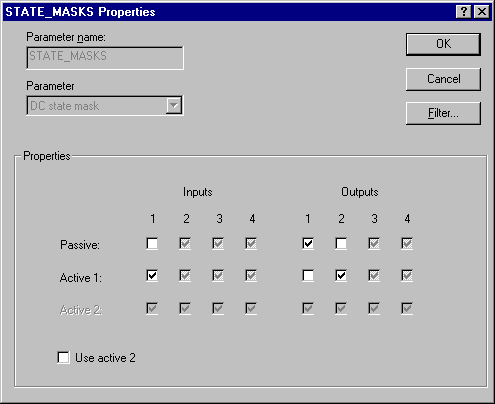
In this example, if IO_IN_1 is True (1), the FV_D parameter value is 1, indicating the Active 1 state. When the block sets OUT_D to a value of 1 to request the Active 1 state, the Active 1 output mask is used to set IO_OUT_1 to 0 and IO_OUT_2 to 1.
You mark the Use active 2 check box to indicate the Active 2 state is to be used. This is used only to determine whether the Active 2 state is considered when matching bit patterns.
The following figure shows an example definition of the Passive, Active 1, and Active 2-bit masks for a group of input and output I/O parameters.
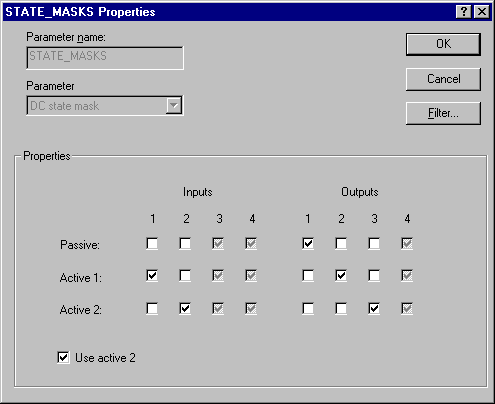
In this example, if IO_IN_1 is False and IO_IN_2 is True, the FV_D parameter value is 2, indicating the Active 2 state. When the block sets OUT_D to a value of 2 to request the Active 2 state, the outputs are set as follows:
IO_OUT_1 = False (0)
IO_OUT_2 = False (0)
IO_OUT_3 = True (1)
IO_OUT_4 = Grayed out (0)
The grayed out output settings are always set to False.
Simulation
To support testing, you can enable simulation. This allows the measurement value and status to be supplied manually or from another block.
During configuration, decide whether you want the simulated value/status to be entered manually during operation or you will use a value/status from another block for the simulated value/status.
When the value is entered manually:
-
The operator first enables simulation by selecting the SIMULATE_D parameter and setting the Simulate Enabled check box in the Simulate Enabled/Disabled field.
-
If SIMULATE_IN_D is not connected (status = Bad: NotConnected), the operator enters the value to be used in the SIMULATE_D parameter Simulate Value field. In online operation, the operator can enter a simulated status value in the Simulate Status field.
Make sure SIMULATE_IN_D is not connected if you want to enter the value or status manually. When SIMULATE_IN_D is connected, the value from the SIMULATE_IN_D Value field is used as the simulated value.
When the value/status from another block is used:
-
During configuration, connect SIMULATE_IN_D to the desired block output or parameter. Do not enter a value in the Simulate Value field of the SIMULATE_IN_D input; the block uses the connected value automatically.
-
During operation, the operator enables simulation by selecting the SIMULATE_D parameter and setting the Simulate Enabled check box in the Simulate Enabled/Disabled field.
Do not enter a value for the SIMULATE_IN_D parameter. When you do and the status of SIMULATE_IN_D is not Bad: NotConnected, the manually entered value for SIMULATE_IN_D overrides any value you enter in SIMULATE_D.
Tracking
The TRK_IN_D input is used to force the OUT_D to track FV_D. When TRK_IN_D is True, OUT_D is set equal to FV_D when it is in Passive, Active 1, or Active 2 state. The actual mode of the block is Local Override (LO). If the SP Track device option is True, SP_D is copied from OUT_D.
The value of PV_D usually is set to the value of FV_D. However, when the ACCEPT_D parameter is True, PV_D is set to the value of OUT_D. Whenever OUT_D changes from its previous value, the block automatically sets ACCEPT_D to False.
Device options
The device options (DEVICE_OPTS) parameter allows you to select the optional control logic used in the block. You select one or more of the device options by selecting that option in the DEVICE_OPTS Parameter Properties dialog. The following device options are available:
With the Passive on Active Timeout device option, a confirm time-out alarm is generated and the DC_STATE is changed to the failed Active state. In Auto mode, SP_D must be manually entered to attempt the Active state again. In Cas mode, SP_D must be changed to Passive and then back to the Active state to attempt the Active state again.
The Passive when Confirmed device option is used for devices, such as a motor operated valve, that require the drive signal to the device to stop when the requested state is reached.
With the Permissive device option, an OUT_D change from Active to Passive is never blocked.
Block errors
-
Simulate active — Simulation is enabled and the block is using a simulated value in its execution.
-
Input failure/process variable has Bad status — The hardware is bad.
-
Local override — The block is in Local Override (LO) mode.
-
Output failure — The output is not valid.
-
Readback failed — The I/O readback failed.