The following figure shows the timed response of the Manual Loader function block:
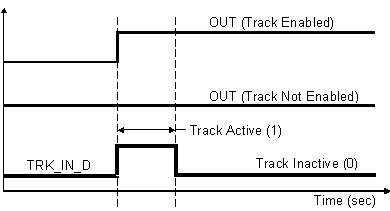
The Manual Loader function block allows an operator to control devices directly by setting the block output. You select the way the output is generated with parameter configuration and input wiring.
Input Filtering
You can filter the input value (IN) before it is stored in the PV parameter. You specify the filtering applied to the IN parameter with the filter time constant (PV_FTIME). The PV value is used in block alarm detection.
Track Input Conversion
The track input parameter (TRK_VAL) is converted to the range of the block output based on the track range parameter (TRK_SCALE) and the output range parameter (OUT_SCALE). In Local Override (LO) mode, the scaled value is used to set OUT.
Output Limit Scaling
During download OUT_HI_LIM and OUT_LO_LIM are set to their configured values. If you have not changed these values from their defaults they are set as follows during the first execution of the block:
During runtime the limits are restricted as follows:
-
OUT_HI_LIM is restricted to OUT_SCALE(EU100) + 0.1 × (OUT_SCALE(EU100) - OUT_SCALE(EU0)).
-
OUT_LO_LIM is restricted to OUT_SCALE(EU0) - 0.1 × (OUT_SCALE(EU100) - OUT_SCALE(EU0)).
The OUT parameter is not changed as a result of changing the scale or limits. However, if OUT violates the new limits OUT is forced within the limits on the next execution of the block.
Output Selection and Limiting
In Manual (Man) mode, the value of OUT is determined by the operator. In LO mode, the converted track input is used as the output value. In Initializing Manual (IMan) mode, the path to the output is not complete and OUT is set to BKCAL_IN.
Block Errors
The following conditions are reported in the BLOCK_ERR parameter:
Local override — The block is in Local Override (LO) mode.
Out of Service — The block is in Out of Service (OOS) mode.