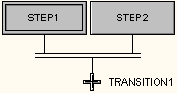
- Select one of the steps that you want to connect to a parallel convergence.
- Place the cursor over a connection point. The cursor changes to a
 . Click the left mouse button and drag the connection to the transition following the step.
 - Select the other step that you want to connect to a parallel convergence.
- Place the cursor over that step's connection point. The cursor changes to a . Click the left mouse button and drag the cursor to the same transition. (This creates the parallel convergence.)
- Repeat steps 3 and 4, if necessary, for other steps.