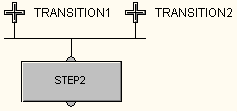
A sequence select convergence connects two or more transitions to a particular step. It converges or brings together two or more parallel paths in a sequence.
-
Place the cursor over one of the transitions where you want the
sequence select convergence. The cursor changes to
 .
.
- Click the left mouse button and drag the connection to the step following the transition.
-
Place the cursor over the next transition where you want the
sequence select convergence. Click the left mouse button and drag the
cursor to the same step.
- Repeat step 3, if necessary, for other transitions.