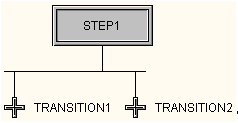
A sequence select divergence allows the SFC to execute different steps depending on which conditions are True.
-
Place the cursor over the step where you want the sequence select divergence. The cursor changes to
 .
.
- Click the left mouse button and drag the connection to one of the transitions following the step.
-
Place the cursor over the step again. Click the left mouse button and drag the cursor to the other transition.
- Repeat step 3, if necessary, for other transitions.