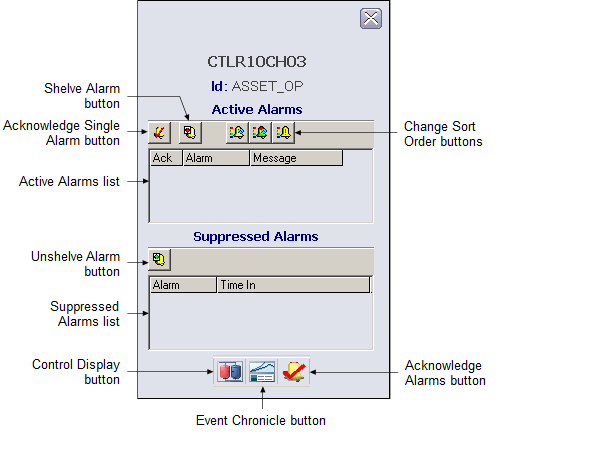
The following items are contained in the asset alarm faceplate:
-
Active Alarms list - Contains the currently active alarms along with the alarm message and an indicator that shows if the alarm has been acknowledged.
-
Suppressed Alarms list - Contains the alarms that are currently suppressed along with the time they were suppressed.
-
Shelve Alarm button - Moves the alarm currently selected in the Active Alarm list to the Suppressed Alarm list.
-
Unshelve Alarm button - Moves the alarm currently selected in the Suppressed Alarm list to the Active Alarm list.
-
Acknowledge Single Alarm button - Acknowledges the currently selected alarm in the Active Alarm list.
-
Change Sort Order buttons - Click a button to sort the alarm list. The choices, from left to right, are:
-
Toolbar - Click a button to perform a task. The choices, from left to right, are: