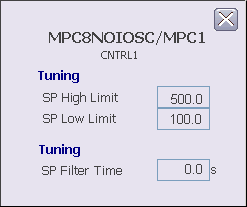
The MPC CV detail display includes the following items:
-
SP High Limit - This field displays the maximum value of the SP in engineering units. Double-click this value to get a prompt that allows you to enter a new limit. The valid input range for this value is -99999 to 99999.
-
SP Low Limit - This field displays the minimum value of the SP in engineering units. Double-click this value to get a prompt that allows you to enter a new limit. The valid input range for this value is -99999 to 99999.
-
SP Filter Time - This field indicates the SP filter time constant in seconds. Double-click this value to get a prompt that allows you to enter a new value. The valid input range for this value is 0.00 to 600.0 seconds.