Figure: DeltaV Operate View of the MPC Manipulated Variable (MV) Detail Display
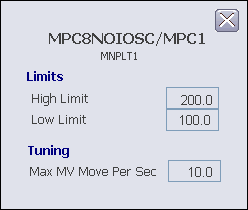
The MPC MV detail display includes the following items:
-
High Limit - This field displays the maximum value of the Manipulated variable in engineering units. Double-click this value to get a prompt that allows you to enter a new limit. The valid input range for this value is -99999 to 99999.
-
Low Limit - This field displays the minimum value of the Manipulated variable in engineering units. Double-click this value to get a prompt that allows you to enter a new limit. The valid input range for this value is -99999 to 99999.
-
Max MV Move Per Sec - This field indicates maximum amount (in engineering units) of change allowed per sec. The valid input range for this is any positive number up to 99999.