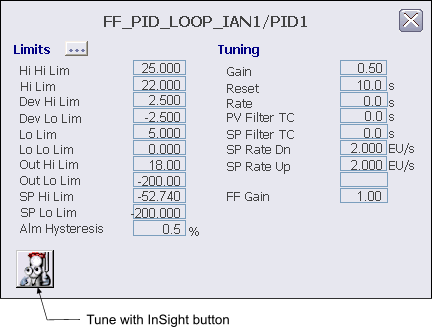
The following items are contained in the FFPID function block detail display:
-
Tune with InSight button - Press this button to start DeltaV InSight in the context of this block.
-
Limits:
-
Hi Hi Lim - This area displays the maximum value of the PV in engineering units before the high high limit active bit (HI_HI_ACT) is set. Click this field to enter a new limit.
-
Hi Lim - This area displays the maximum value of the PV in engineering units before the high limit active bit (HI_ACT) is set. Click this field to enter a new limit.
-
Dev Hi Lim - This area displays the maximum positive deviation of the PV from SP in engineering units before the high deviation limit active bit (DV_HI_ACT) is set. Click this field to enter a new limit. The valid input range for this value is 0 to + PV span.
-
Dev Lo Lim - This area displays the maximum negative deviation of the PV from SP in engineering units before the low deviation limit active bit (DV_LO_ACT) is set. Click this field to enter a new limit. The valid input range for this value is 0 to + PV span.
-
Lo Lim - This area displays the minimum value of the PV in engineering units before the low limit active bit (LO_ACT) is set. Click this field to enter a new limit.
-
Lo Lo Lim - This area displays the minimum value of the PV in engineering units before the low low limit active bit (LO_LO_ACT) is set. Click this field to enter a new limit.
-
Out Hi Lim - This area displays the maximum value of the output in engineering units. Click this field to enter a new limit. The valid input range for this value is -10 to 110 % of the output scale in engineering units.
-
Out Lo Lim - This area displays the minimum value of the output in engineering units. Click this field to enter a new limit. The valid input range for this value is -10 to 110 % of the output scale in engineering units.
-
SP Hi Lim - This area displays the maximum value of the SP in engineering units. Click this field to enter a new limit. The valid input range for this value is -10 to 110 % of the PV Scale in engineering units.
-
SP Lo Lim - This area displays the minimum value of the SP in engineering units. Click this field to enter a new limit. The valid input range for this value is -10 to 110 % of the PV Scale in engineering units.
-
Alm Hysteresis - This area displays the alarm hysteresis (or deadband) value for the alarm conditions in % of PV Scale. Click this field to enter a new value. An alarm condition does not recur until the PV has backed away from the corresponding limit by at least the % of PV Scale specified by this value.
-
-
Tuning:
-
Gain - This field indicates the gain used in the PID algorithm. Click this field to enter a new value.
-
Reset - This field indicates the integral time constant used in the PID algorithm. Click this field to enter a new value.
-
Rate - This field indicates the derivative time constant used in the PID algorithm. Click this field to enter a new value.
-
PV Filter TC - This field indicates the PV filter time constant in seconds. Click this field to enter a new value.
-
SP Filter TC - This field indicates the SP filter time constant in seconds. Click this field to enter a new value.
-
SP Rate Dn - This field indicates the maximum negative change to the WORKING_SP in engineering units that is allowed per second. Click this field to enter a new value. A value of 0.0 indicates that no rate limiting will be done.
-
SP Rate Up - This field indicates the maximum positive change to the WORKING_SP in engineering units that is allowed per second. Click this field to enter a new value. A value of 0.0 indicates that no rate limiting will be done.
-
FF Gain - This field indicates the gain used in the feedforward algorithm. Click this field to enter a new value. This field is visible whenever FF_ENABLE is True.
-