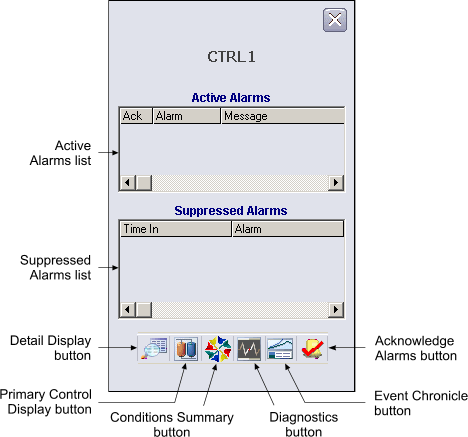
This faceplate is used as the default faceplate to display hardware alarms for DeltaV nodes. You can open the Hardware Alarms faceplate in DeltaV Operate run mode by clicking the hardware alarm in the Alarm Banner or clicking the Open Faceplate button on the Toolbar.
The following items are contained in the faceplate:
-
Active Alarms list - Contains the currently active alarms listed by alarm name and an indicator that shows if the alarm has been acknowledged.
-
Suppressed Alarms list - Contains the alarms that are currently suppressed listed by alarm name.
-
Detail Display button - Opens the configured detail display for the node.
-
Primary Control Display button - Opens the configured primary control display for the node.
-
Condition Summary button - Launches the Condition Summary application in the context of the node.
-
Diagnostics button - Launches the DeltaV Diagnostics application in the context of the node.
-
Event Chronicle button - Open the Process History Viewer in the context of the node.
-
Acknowledge Alarms button - Acknowledges all the alarms in the Active Alarms list.