For more information, refer to the Input Selector function blocktopic.
-
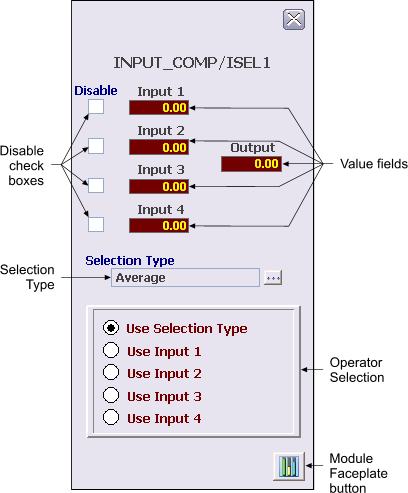
Disable check boxes - When a Disable check box is checked, its corresponding input will not be used by the selection algorithm.
-
Value fields - These fields indicate the value and status of the inputs (IN_1, IN_2, IN_3, IN_4) and the output (OUT). Status is indicated by background color (Good=Gray, Uncertain=Orange, Bad=Red).
-
Selection Type - Indicates and allows entry for the parameter SELECT_TYPE, which chooses the selection algorithm to use, MAX, MIN, MID, FIRST_GOOD, AVG, or HOT_BACKUP.
-
Operator Selection - These radio buttons allow the operator to choose how the output (OUT) is determined. OUT can be calculated by the selection algorithm or set equal to any of the input values.
-
Module Faceplate button - This button is used to open the module faceplate display.