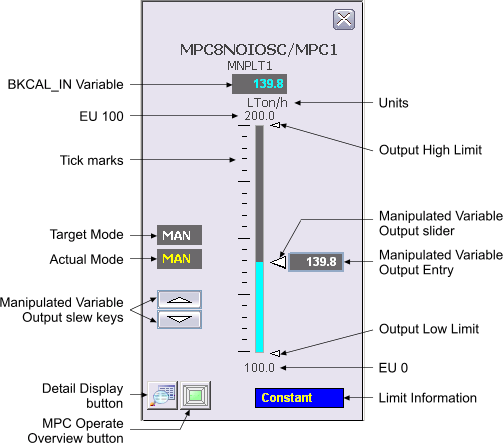
The following items are contained in the faceplate:
-
BKCAL_IN Variable - This field displays the BKCAL_INn value of the MPC block in yellow. The background color of the 3-D box changes from gray to orange or red when the BKCAL_INn status becomes uncertain or bad, respectively. The BKCAL_INn value is visible in the decimal format provided by MNPLTn_SCALE.DECPT.
-
Units - This area provides the engineering units description used for the Manipulated Variable as defined in the MNPLTn_SCALE parameter.
-
EU 100 - This value corresponds to 100% of scale for MNPLTn.
-
Target Mode – This field contains a word in white text that describes the target mode for the loop.
-
Actual Mode – This field contains a word in yellow text that describes the ACTUAL mode of the loop.
-
Manipulated Variable Output slew keys - These buttons with an arrowhead pointing up or down are used to increment or decrement the setpoint value by 1 MNPLTn engineering unit if MNPLTn_SCALE.F_DECPT is less than or equal to 1. If MNPLTn_SCALE.F_DECPT is 2 or greater, each click changes the setpoint by 0.1 engineering unit. The setpoint slew keys are visible if the target mode is AUTO, MAN, or OOS.
-
EU 0 - This value corresponds to 0% of scale for the Manipulated Variable.
-
Tick marks - Use this vertical arrangement of black lines to indicate percentages of MNPLTn scale.
-
BKCAL_INn bar graph - This field indicates the value of the BKCAL_INn parameter for the MPC block, which is the same as the value displayed in the BKCAL_IN Variable display box.
-
Manipulated Variable Output slider - To move this button, hold down the left mouse button while the cursor is over the arrowhead and then move the mouse up or down to correspond to the new manipulated value desired. The new value is then written to the MNPLTn parameter of the MPC block. The arrowhead is controllable only when the target mode is MAN.
-
Manipulated Variable Output Entry - A 3-D recessed box displaying the MNPLTn value of the nth Manipulated Variable in the MPC block is next to the Setpoint slider. The background color of this box changes to orange or red when the MNPLTn status becomes uncertain or bad, respectively. Double-clicking this box while the target mode is MAN produces a dialog that prompts you for an manipulated value. The valid range for input is defined by the engineering unit EU 0 and EU 100 values of MNPLTn_SCALE. Valid input ranges from -10 percent to 110 percent of MNPLTn scale. The MNPLTn value is visible in the decimal format provided by MNPLTn_SCALE.DECPT.
-
Output Limits - These arrowheads are vertically positioned relative to the MNPLTn bar graph to indicate the High and Low Limits. Although these arrows cannot be dragged with the mouse, the values they indicate can be modified by using the detail display.
-
Detail Display button – This button opens the detail display for the loop module.
-
MPC Operate Overview button – This button is used to open the MPC Operate picture for this loop module.
-
Limit Information - This field displays a word in yellow text representing the MV_ACT[n] value of the MPC block. The background color of the 3-D box changes from gray to blue when the MV_ACT[n] value is non-zero. The text displayed represents the following values:
Value
Text
0.0
Not Limited
1.0
Low Limited
2.0
High Limited
3.0
Constant