The module library includes several pop-up faceplate displays. These displays are located in the DELTAV\DVDATA\GRAPHICS-iFIX\PIC\FACEPLATE subdirectory. The following table lists the module faceplates and their application:
|
AALM_FP |
Used by the AALARM monitoring module template. |
|
AI_FP |
Used by the ANALOG monitoring module template. |
|
ALM_FLD_SUP_FP |
Used by the Alarm flood suppression module templates. |
|
ALM_FO_SUP_FP |
Used by the First out alarm suppression module template. |
|
ALM_STATS_FP |
Used by the Operator Statistics module template. |
|
RMT_SPM_FP |
Used by the Rosemount Statistical Process Monitoring module templates. |
|
CDA_FP |
Used by modules with command-driven algorithms |
|
DI_FP |
Used by the DISCRETE monitoring module template. |
|
DL_FP |
Used by all of the motor and valve module templates. |
|
DTC_FP |
Used by the PID_DEADTIME module template. Similar to LOOP_FP. |
|
EDC_FP |
Used by the VLV_DCC_EDC module template. |
|
FFLP_FP |
Used by the fieldbus loop module template, FF_PID_LOOP. Similar to LOOP_FP. |
|
FLC_FP |
Used by the Fuzzy Logic Control templates, FLC_LOOP and SIM_SR_FLC. Similar to LOOP_FP. |
|
LOOP_FP |
Used by the PID loop module templates (PID_LOOP, CASCADE_MASTER, CASCADE_SLAVE, PID_GAINSCHED, SIM_SR_PID). |
|
LOOPM_FP |
Used by the MPC_LOOP module template. |
|
MOD_FP |
Generic module faceplate; works with any module. |
|
PLM_FP |
Used by Phase Logic modules. |
|
SDA_FP |
Used by modules with state-driven algorithms. |
|
SHDI_FP |
Used by the DISCRETE_SH and RMT_DISCRETE_SH module templates. |
|
Switch_FP |
Used by Smart Switch modules. |
|
UM_FP |
Used by Batch Unit modules. |
|
UMC_FP |
Used by Continuous Unit modules. |
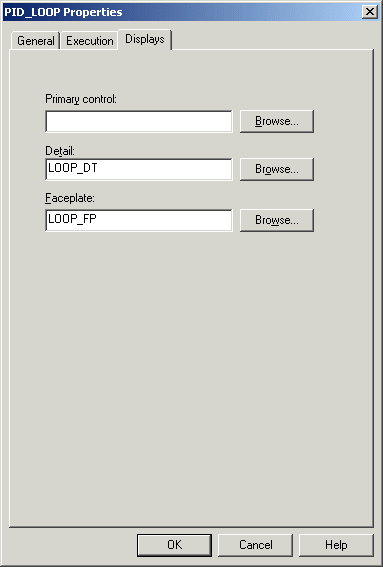
Each module template in the library contains the name of one of these displays as a property. Therefore, modules created from a module template also contain the name of a faceplate as a property. The Properties dialog for the PID_LOOP module template is shown in the Module Properties Dialog. Modules that are created new (that is, that are not copied from a template or another module) do not have a faceplate defined.
The only configuration necessary to make a DeltaV faceplate work in DeltaV Operate (run mode) is to paste the appropriate dynamo and enter the tag of a module that contains the faceplate as a property. You can create faceplates of your own or use the DeltaV faceplates as the starting points for your own displays. When starting from a DeltaV display, make a copy of the display first. It is recommended that you use the Update Popup Pictures button on the DeltaV Utilities toolbar if you modify pop-up pictures. Refer to Updating Pop-up Pictures and Dynamos in the topic Working with Pictures - Additional Functions for more information
Your custom faceplates must have a .GRF extension and be located in the FACEPLATE subdirectory.