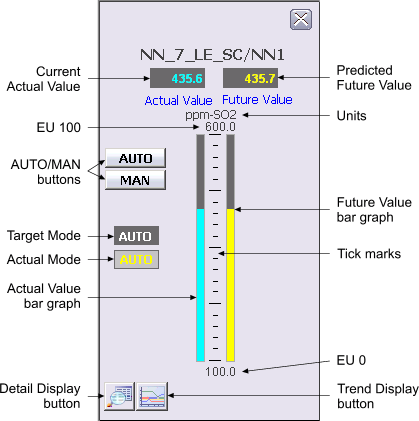
The following items are contained in the Neural Network function block faceplate:
-
Current Actual Value – This area displays the current OUT value of the Neural Network block in cyan. The background color of the 3-D box changes from gray to orange or red when the Output status becomes uncertain or bad, respectively.
-
Predicted Future Value – This area displays the predicted future value of the Neural Network block in yellow.
-
Engineering Units – This is the engineering units description for the Actual Value and Future Value as defined in the OUT_SCALE parameter.
-
EU 100 – This is the value corresponding to 100% of scale for the Actual Value and Future Value.
-
AUTO/MAN buttons – These buttons are used to set the target mode of the block to the corresponding mode.
-
Target Mode – This field contains a word in white text that describes the target mode for the loop. The background changes to blue when the target mode and normal mode are different.
-
Actual Mode – This field contains a word in yellow text that describes the ACTUAL mode of the loop. The background changes to blue when the actual mode and normal mode are different.
-
Actual Value bar graph – This field indicates the value of OUT, which is the same as the value displayed in the Actual Value display box.
-
Tick marks – This vertical arrangement of black lines is used to indicate percentages of PV and Output scale.
-
Future Value bar graph – This graph indicates the predicted future value of the block, which is the same as the value displayed in the Future Value display box.
-
EU 0 – This area shows the value corresponding to 0% of scale for the Output.
-
Follow Active – This field indicates that the output is tracking the input or the input times gain.
-
Detail Display button – This button opens the detail display for the Neural Network block.
-
Trend Display button – This button opens the trend display for the Neural Network block. A trend display is a popup picture that shows a one second trend trace for each of the module's main operating parameters. The trend traces start when the picture is opened and stop when it is closed.