The information in this topic also applies to the DTC_FP_KB, FFLP_FP_KB, and FLC_FP_KB Operator Keyboard faceplates, which are very similar in appearance and function to the PID Loop Operator Keyboard Faceplate.
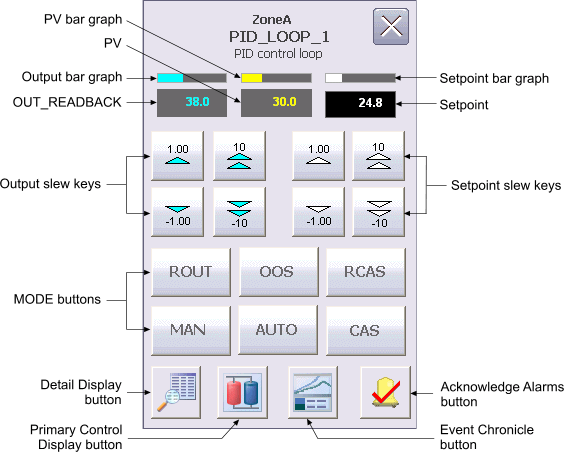
The PID Loop Operator Keyboard faceplate contains the following items:
PV bar graph – A bar graph, indicating the value that appears in the PV field.
PV – This field displays the PV value of the loop module in yellow. The background color of the field changes from gray to orange or red when the PV status becomes uncertain or bad, respectively. The background blinks red when the PV Bad alarm is unacknowledged. The PV value is visible in the decimal format provided by PV_SCALE.DECPT.
Output bar graph – A bar graph, indicating the value that appears in the OUT_READBACK field.
OUT_READBACK – This field displays the OUT_READBACK value of the loop module in cyan. The background color of the field changes from gray to orange or red when the Output status becomes uncertain or bad, respectively. In the absence of a configured IO_READBACK DST, the OUT_READBACK value shown is equal to the implied output value of the loop. The displayed decimal format of OUT_READBACK is determined by the OUT_SCALE.DECPT parameter field.
Output slew keys – These gray buttons with cyan arrowheads appear only when the loop has a target mode of MAN or OOS. Click the corresponding button to increment or decrement the output value by 1 or 10 engineering units.
MODE buttons – These buttons are used to set the target mode of the PID block. Only buttons for valid modes appear on the faceplate.
A gray outline appears around the button for the current actual mode. If this is not the button for the target mode, the label on this button blinks. A blue outline appears around the button if the target mode does not match the normal mode, but the target mode matches the actual mode.
Setpoint bar graph – A bar graph, indicating the value that appears in the Setpoint field.
Setpoint – This field displays the Setpoint value of the loop module in white. The background color of this field changes from gray to orange or red when the PV status becomes uncertain or bad, respectively. The valid range for the SP value is from 0 to 100 percent of PV_SCALE. The SP value is visible in the decimal format provided by PV_SCALE.DECPT.
Setpoint slew keys – These gray buttons with white arrowheads appear only when the loop has a target mode of AUTO, MAN, or OOS. Click the corresponding button to increment or decrement the setpoint value by 1 or 10 engineering units.
Detail Display button – Open the detail display for the loop module.
Primary Control Display button – Open the primary control display.
Event Chronicle button – Open the Process History Viewer.
Acknowledge Alarms button – Acknowledge all alarms on this module.
Module Error indicator (not shown) – A flashing blue bar is displayed below the Detail Display button when a module error occurs. This prompts you to go to the detail display to view and clear the error.