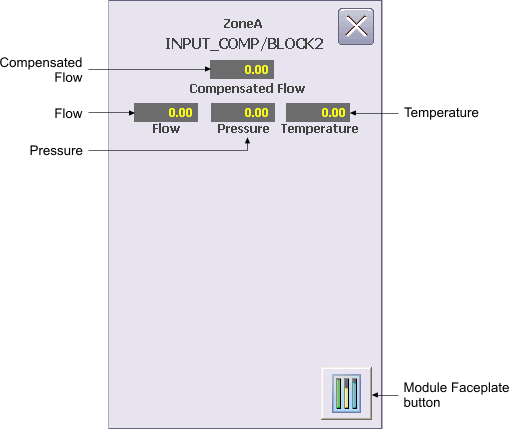
The Pressure/Temperature Composite Block Operator Keyboard faceplate configured for a gas stream contains the following items:
Compensated Flow – This field displays the compensated flow of a gas stream. The background color of the field indicates the status of the measured flow (Good=Gray, Uncertain=Orange, Bad=Red).
Flow - This field displays the measured flow of the gas stream.
Pressure – This field displays the measured presssure of the gas stream. The field is visible based on the configured compensation type (COMP).
Temperature – This field displays the measured temperature of the gas stream. The field is visible based on the configured compensation type (COMP).
Module Faceplate button - This button is used to open the module faceplate display.
For more information, refer to the Function Block Composites topic.
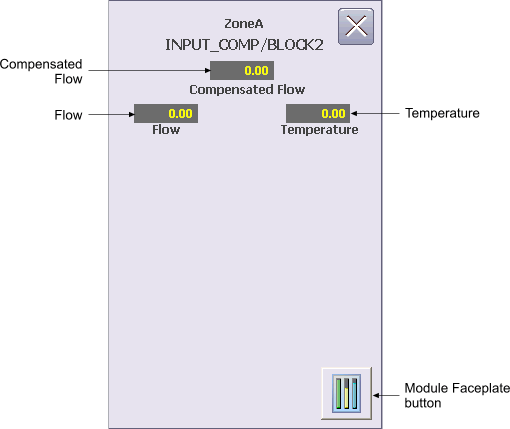
The Pressure/Temperature Composite Block Operator Keyboard faceplate configured for a liquid flow contains the following items:
Compensated Flow – This field displays the compensated flow of a liquid stream. The background color of the field indicates the status of the measured flow (Good=Gray, Uncertain=Orange, Bad=Red).
Flow - This field displays the measured flow of the liquid stream.
Temperature – This field displays the measured temperature of the liquid stream. The field is visible based on the configured compensation type (COMP).
Module Faceplate button - This button is used to open the module faceplate display.
For more information, refer to the Function Block Composites topic.