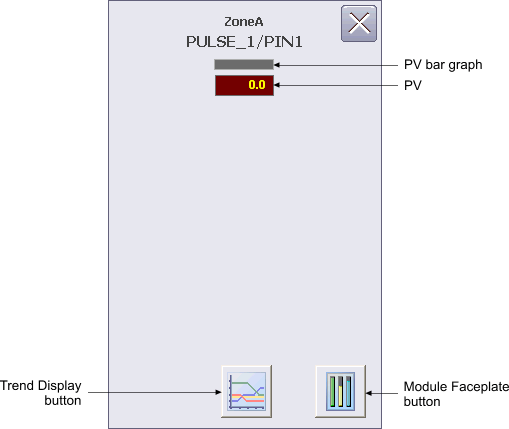
The Pulse Input Function Block Operator Keyboard faceplate contains the following items:
PV bar graph – This graph indicates the value of the PV parameter for the AI, which is the same as the value displayed in the PV field.
PV – This field displays the PV value of the AI block in yellow. The background color of the field changes from gray to orange or red when the PV status becomes uncertain or bad, respectively. The PV value is visible in the decimal format provided by PV_SCALE.DECPT.
Trend Display button – This button is used to open the trend display for the AI block. A trend display is a popup picture that shows a one second trend trace for each of the module's main operating parameters. The trend traces start when the picture is opened and stop when it is closed.
Module Faceplate button - This button is used to open the module faceplate display.