DeltaV Operate includes global pages that allow you to store public objects, methods, forms, and variable objects so they can be accessed from anywhere within your system.
The FactoryGlobalspage contains the subroutines and all of their supporting variables, forms, and functions. The FactoryGlobals file is write-protected to maintain the integrity of these scripts. See the globalsubroutines.txt file, located in the DeltaV\iFIX\NLS folder, for more information on the subroutines that are stored in the FactoryGlobals page.
The User page is the location where you can put your own objects, methods, forms, and variables that you want to use globally.
Since you can access the items that you define as public in the User page from anywhere in the system, make sure that what you enter is really what you want to expose. If you create a global public variable, remember that it can be changed from any script at any time.
This section provides examples of the items that you might want to include in your User page, including:
Creating a Global Variable Object
Variable objects can be stored in the User page so that they can be accessible throughout your application, regardless of which pictures are open.
To make a variable object global by adding it to the User page:
- Double-click the Globals folder in DeltaV Operate system tree.
- Right-click the User icon and select Create Variable. An icon representing the Variable object appears under the User icon.
- Right-click the Variable object icon and select Animations. The Animations dialog box appears.
- Set values for the Variable object and click OK.
You can also create a global variable using the Variable Expert:
Creating a Global Threshold Table
You can also configure a system-wide threshold table. Global threshold tables provide you with more centralized control over your system's data conversions. If you created a global threshold table that defined colors for value ranges, and you need to change a color or a value because you are moving to a different system, you only need to change it in one place.
To create a global threshold table that is used for all current alarms in the system:
- Double-click the Globals folder in the DeltaV Operate system tree.
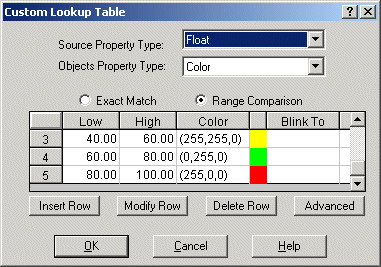
- Right-click the User icon and select Create Threshold Table from the pop-up menu. The Custom Lookup Table dialog box appears as shown in the following figure.
- Keep the default values of the dialog box and click OK. A threshold table icon appears under the User icon.
To name the table:
- Right-click the new threshold table's icon in the DeltaV Operate system tree and select Property Window from the pop-up menu.
- Enter CurrentAlarmThresholds as the value for the Name property.
Once you have named your threshold table, you can make connections from DeltaV Operate objects to this table. The following procedure provides an example of how to connect an object, in this case an oval, to a global threshold table named CurrentAlarmThresholds.
To connect an oval to a global threshold table:
- Create an oval.
- Right-click on the oval and select Animations.
- Select the Color tab.
- Select the Animations checkbox next to the property you want to animate.
- In the Data Source field, enter a database tag.
- Select Advanced at the bottom of the lookup table.
- Under Shared Lookup Object, enter the global Thresholds table name in the Table field.
The oval will now use the CurrentAlarmThresholds table instead of a custom table. Likewise, you can configure all objects that are assigned a Color By Current Alarm animation to use the CurrentAlarmThresholds table. If you ever need to change a color, value, or type, you only have to change it in one place.
Creating a Global Procedure
You may want global access to subroutines and functions if you use them frequently. DeltaV Operate provides global subroutines and functions, such as OpenPicture, ToggleDigitalPoint, and OnScan, that you can use in your pictures and schedules. You can also include your own global subroutines and functions in the User page.
The following example adds a global subroutine to the User page:
- Open the Visual Basic Editor.
- If the Project Explorer is not already displayed in the VBE, select Project Explorer from the View menu.
- Select the Project_User project in the Project Explorer.
- From the Insert menu, select Module. You need to store your code in a module and not in the Project_User page itself.
-
Enter the following code in the Code window:
Public Sub DisplayMyMessage() MsgBox "This is my message box." End Sub - Close the Code window and create a rectangle in your picture.
- Right-click the rectangle
and select Edit Script from the pop-up menu. VBE opens the Code window for the
rectangle's Click event. Enter the following in the Code window:
DisplayMyMessage
- When you click the rectangle in the run-time environment, the message box that was stored in the Project_User page appears.