Auto-sense LS CHARMs
When you assign a physical CSLS to a placeholder you are asked if you want to auto-sense LS CHARMs. You can also initiate an auto-sense from the context menu of an LS CHARMs I/O subsystem.
A timer dialog appears until auto-sensing is complete when the Auto-sense CHARMs dialog opens.
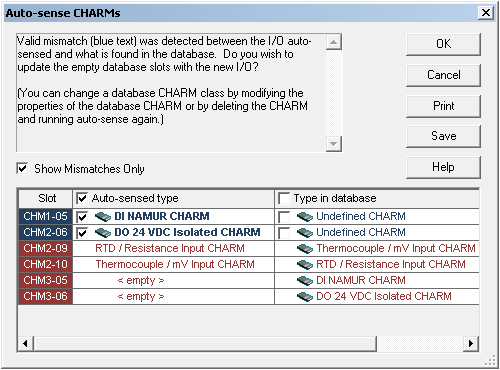
The dialog lists the auto-sensed CHARM types and the CHARM types that have been configured and downloaded to the database. To view a list of only the mismatched CHARM types, select the Show Mismatches Only option.
Mismatches that have been resolved by auto-sensing appear in blue, with the check box for the auto-sensed CHARM type selected by default. Optionally, you can retain the CHARM type configuration in the database, by selecting its check box in the Type in database column. To retain all of the CHARM type configurations currently in the database, select the Type in database check box at the top of the column.
Mismatches that appear in red cannot be resolved by auto-sensing. This usually indicates one of the following conditions:
To manually resolve mismatches of this sort generally requires either installing or replacing a CHARM in the CHARM Baseplate and/or reconfiguring the properties of the CHARM in the database.
You can auto-sense CHARMs anytime to recognize any hardware changes by selecting Auto-sense CHARMs from the CHARMs container.