fieldbus device commissioning and decommissioning
Commissioned - For a fieldbus device that is at its assigned address. To move a commissioned device to the decommissioned–Off-line or Spare state, you first decommission the device.
 CAUTION
It is recommended that if you intend to keep a fieldbus device in the decommissioned–Off-line or decommissioned–Spare statesfor any length of time, you remove the device from the segment. A decommissioned fieldbus device is given a temporary address and failure to remove it from the segment could prevent normal commissioning on the segment.
Decommissioned–Off-line - For a fieldbus device that you want to disconnect for maintenance and then return to the segment at the same address. For example, you would take a device offline to recalibrate it. If a decommissioned–off-line device is reconnected, it automatically uses a standby address. You must commission the decommissioned–Standby device by dragging and dropping it onto the appropriate placeholder. After the device is commissioned, download the device in order to make it function as it did prior to being decommissioned.
Decommissioned–Spare - For a fieldbus device that you want to disconnect and no longer use in your DeltaV system. Each device has a device tag that designates the role the device performs in the DeltaV system. If you decide that you no longer want to use the device, you should clear its tag. To clear the tag, make the device decommissioned–Spare. A decommissioned–Spare device is part of your inventory of spare devices, not an instrument with a specific purpose. If, at some time, you decide to put a decommissioned–Spare device back into service, the system moves it to decommissioned–Standby automatically when you attach the device to the segment.
Decommissioned–Standby - A safety feature for fieldbus devices. The device is moved to a standby address until it is commissioned. A device comes to decommissioned–Standby from the decommissioned–Off-line and Spare states.
Decommissioned–Mismatch - The fieldbus device was commissioned on another control system and then connected to a DeltaV system. When the H1 card finds a device in the assigned address range that has not been commissioned for this particular segment, it designates it as decommissioned–mismatched. A decommissioned–mismatch device can be commissioned.
Device Class Mismatch - The attached field device is not the same class for which the device was commissioned.
Schedule Download Failed - The LAS Schedule could not be downloaded to this field device.
The following figure shows state transitions in fieldbus devices.
State Transitions
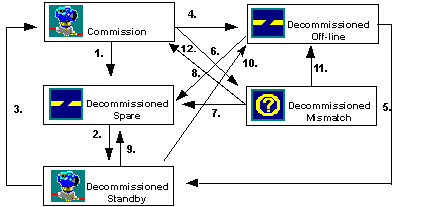
A commissioned device is decommissioned to Spare. The device is usually removed from the segment after doing this. A decommissioned–Spare device loses its address and device tag. Note that a commissioned device automatically changes to decommissioned–Spare if its placeholder is deleted.
A decommissioned device that has not been removed from the segment is placed in decommissioned–Standby. This might occur if a decommissioned–Mismatch device had been made decommissioned–Spare and you want to put it in decommissioned–Standby without taking it off the segment.
A decommissioned–Standby device is dragged to an available placeholder that matches the manufacturer, device type and device revision and is commissioned. Another way to commission a decommissioned–Standby device is to select Commission from the device's context menu.
A commissioned device is taken Off-line. the device retains its tag and address in the DeltaV database but loses its physical address on the segment. This is normally done when the device is to be temporarily removed from the segment and reattached in the same service. The device must be removed from the segment after it is taken Off-line.
A device can transition from decommissioned–Off-line to decommissioned–Standby when it is attached to a segment other than the one from which it was removed.
A commissioned device is removed from a segment and attached to a segment other than the one from which it was removed. The device might have been inadvertently attached to the wrong segment.
A decommissioned–Mismatch device is made decommissioned–Spare.
A decommissioned–Off-line device is made decommissioned–Spare. This is done if a device is placed on a segment with another device with the same tag as this device. Making the device spare allows you to clear the device tag without removing the device from the segment.
A decommissioned–Standby device can transition to decommissioned–Spare if it was previously in the decommissioned–Spare or decommissioned–Off-line state before it was in the decommissioned–Standby state.
A decommissioned–Standby device can transition to decommissioned–Off-line if it was previously in decommissioned–Off-line state before it was in the decommissioned–Standby state.
A device can transition from decommissioned–Mismatch to decommissioned–Off-line.
A decommissioned–Mismatch device is dragged to an available placeholder that matches the manufacturer, device type and device revision and is commissioned. Another way to commission a decommissioned–Mismatch device is to select Commission from the device's context menu.
Typically, a device will be in one of the above states for only a few seconds. If it remains in one of these states it indicates a problem. Additionally, if a device goes into the Comm Fail state it indicates that the device is communicating on the bus (it is in the live list) but communications between the H1 card and the device is currently disrupted.
If a device remains in the Comm Initializing or Comm Fail state, cycle the device power. If a device remains in the Unrecognized state, it either has not been commissioned or has been attached to the wrong segment. If a device is in the Schedule Download Failure state, then the segment currently does not have a functional backup LAS. If a device shows a Device Class Mismatch, there is something wrong with the device.