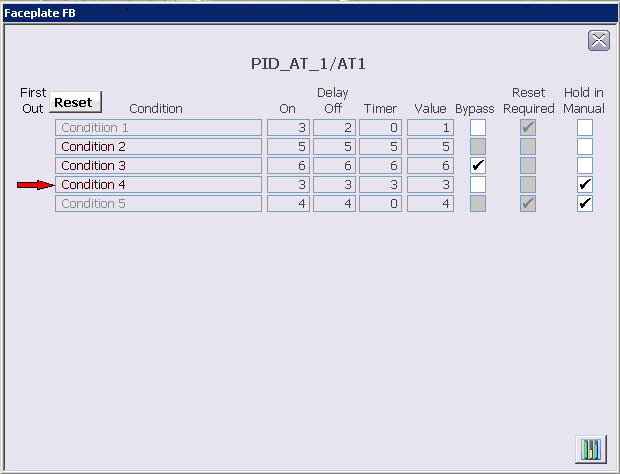
The faceplate shows the configured analog tracking conditions (there
can be as many as 16 conditions). The columns in the faceplate report the
following information about the conditions:
- First Out - A red arrow next to a condition indicates it was the first condition that evaluated to True.
- Condition - The configured description for the condition. Descriptions of inactive conditions are in light gray text.
- Delay On - The time configured to delay the output of the condition when it evaluates to True.
- Delay Off - The time configured to delay the output of the condition when it evaluates to False.
- Delay Timer - Shows the Delay On or Off time remaining after a condition's state changes.
- Value - The track value configured for the condition.
- Bypass - A check mark indicates if the condition has been bypassed. Gray boxes indicate the T_HIGHER_MNGn is True.
- Reset Required - Indicates if a reset is necessary to unlatch the condition after the condition's expression evaluates to False. When a condition that requires a reset becomes inactive, the Reset button appears. All of the boxes are gray to indicate that changes cannot be made from the faceplate.
- Hold in Manual - Indicates if the downstream PID block is set to Manual mode when the condition's output is latched.